According to W3Techs usage data, over 26% of all websites sit behind Cloudflare (September 2026). That means a large share of the data you need to scrape is guarded by Cloudflare’s anti-bot system, which evaluates incoming traffic and can challenge or block requests it classifies as automated.
To see what it takes to bypass Cloudflare with Playwright in 2026, we ran 300 sessions against five Cloudflare-protected pages: Bare Playwright, a DIY stealth stack (Patchright, installed Chrome, residential proxy), and a managed browser.
Short answer: to bypass Cloudflare reliably, the browser and challenge solving mattered most. Bare Playwright loaded 5 of 100 runs. The stealth stack loaded 58 of 100, but none of the 40 on Indeed’s interactive Turnstile. The managed browser loaded 100 of 100.
Three setups, five Cloudflare targets
Key Takeaways
- Bare Playwright loaded 5 of 100 runs. Cloudflare blocked the other 95.
- Patchright with installed Chrome and a residential proxy loaded 58 of 100: 58 of 60 on Glassdoor, Capterra and StockX, 0 of 40 on Indeed.
- Indeed’s interactive Turnstile stopped all 40 stealth-stack runs. Clearing it needs a challenge solver the DIY stack doesn’t have.
- The managed browser loaded 100 of 100, 46 of them after a Cloudflare challenge, at a 6.9-second median.
- DIY was faster on successful runs, 4.0 to 4.1 seconds, but only the managed browser loaded all 5 targets.
Test Your Browser Stack for $5
Run your Playwright code through a real browser and see which requests pass.
- No card required
- API key in 30 seconds
- Change one line of code
How Cloudflare Detects Playwright Scrapers
Cloudflare does not wait for your scraper to reach an origin server. Instead, it evaluates each connection at the edge before serving the page.
Request and Network Fingerprinting
Before a page opens, Cloudflare inspects connection details at the network and transport levels. It checks IP reputation and request rates to filter out data center traffic. It also examines TLS handshake parameters and HTTP headers to confirm the connection matches a real browser. For example, if your client claims to be Chrome but negotiates TLS like a Python HTTP library, Cloudflare blocks the request before the page loads.
Browser Environment and Hardware Signals
Once a page opens, Cloudflare runs client-side JavaScript to inspect the browser runtime. It checks for automation flags like navigator.webdriver, missing plugins, and default headless screen dimensions. It also tests Canvas and WebGL rendering, checks audio context parameters, and queries system fonts. Bundled headless browsers fail here because their APIs and rendering output differ from real desktop browsers. Other anti-bots collect a similar set of signals; see how PerimeterX detects bots.
Session and Contextual Consistency
Cloudflare checks for mismatches between your network location and your browser profile. It compares your proxy IP location against your system timezone from the Intl API, language headers, and system locale. For instance, a residential IP address in Germany paired with an American time zone and English language preferences marks the session as automated. Cloudflare also tracks session cookies across requests to separate human browsing from isolated scripts.
Challenge and Block Enforcement
When Cloudflare detects automation or conflicting signals, it intercepts the session instead of loading the target page. Depending on the site’s WAF configuration, your scraper hits a full Challenge Page, an embedded Turnstile widget, or an HTTP 403 Forbidden block.
Check Your Own Stack
Pick the browser, network and solver you run today. The four layers above light up by what your stack covers, and tested combinations show their measured results.
What does your setup cover?
Layer status follows the article's detection model. Only the three benchmarked combinations show measured numbers; anything else is marked as not tested.
The full source code we used in the benchmark is available in this GitHub repository.
Benchmark Setup and Success Metrics
To evaluate each approach under identical conditions, we tested all three setups against the same five Cloudflare-protected targets. The test protocol measures whether each browser loads the target page, how often Cloudflare blocks it, and how long successful runs take.
Target Selection and Test Scale
We selected five production targets that enforce Cloudflare protections:
- Indeed Google reviews
- Indeed Google company profile
- Glassdoor Google salaries
- Capterra CRM software
- StockX White Thunder
Each setup ran 20 sequential attempts against each target. This resulted in 100 runs per setup and 300 scored runs overall. We enforced a minimum 60-second delay between requests to the same domain to prevent rate limits from triggering blocks. Every run had a 120-second timeout.
Evaluated Setups
The benchmark compared three configurations:
- Bare Playwright: runs stock Playwright and bundled Chromium with a persistent local profile and no proxy.
- DIY Stealth Stack: runs Patchright and installed Google Chrome with a persistent profile and a sticky residential proxy.
- Managed Browser: runs a remote Chrome instance on Surfsky over CDP, with a persistent profile, managed residential proxies, and automated Turnstile challenge handling.
Success Criteria and Classifications
Status codes alone do not prove page access. When Cloudflare challenges a request, the initial document navigation returns an HTTP 403 Forbidden status accompanied by the cf-mitigated: challenge header, while the embedded Turnstile iframe loads with an HTTP 200. An attempt only counted as successful if the browser reached the target URL and verified positive content markers in the page body, like salary tables or review counts.
HTTP 200 is not page access
We assigned each run one of three classifications:
loaded: The page loaded target content directly without triggering a challenge.loaded_after_cloudflare_verification: The page loaded target content after clearing a Cloudflare challenge.blocked_by_cloudflare: The browser failed to reach target content within the 120-second window.
Failure Types and Audit Evidence
When Cloudflare blocked an attempt, we recorded the failure in one of three categories:
cloudflare_verification_page: The browser was held on an interstitial challenge or Turnstile checkbox.cloudflare_403: Cloudflare returned an HTTP 403 Forbidden response.timeout: The browser remained on a Cloudflare challenge screen past the 120-second deadline without loading the target content.
Each run logged full records in JSONL format, including timestamps, final URLs, response headers, cf-ray identifiers, and challenge resource requests. We also captured a screenshot after classification to confirm the page state without adding delay to the access clock.
How DIY Scrapers Fare Against Cloudflare
Running an in-house scraping stack means taking full responsibility for browser fingerprints, proxy pools, and session management. Here is how Bare Playwright and Playwright Stealth with a residential proxy performed across the five targets.
Bare Playwright
For the baseline, Playwright launched bundled Chromium locally in headed mode with a persistent profile on disk. The setup used no proxies, stealth patches, copied cookies, or challenge-solving tools. Requests came directly from the local machine with default headers, default viewport, and unpatched runtime properties.
from playwright.sync_api import sync_playwright

with sync_playwright() as p:
    context = p.chromium.launch_persistent_context(
        user_data_dir="./profiles/bare",
        headless=False,
    )
    context.set_default_navigation_timeout(120_000)
    page = context.new_page()
    page.goto(target_url, wait_until="domcontentloaded", timeout=120_000)
Across 100 runs, Bare Playwright achieved a 5% access rate. Cloudflare blocked 95 of the 100 attempts before target content loaded. It blocked all 20 runs on Indeed Google reviews (0/20) and Glassdoor Google salaries (0/20). Indeed Google company profile loaded 1 out of 20 runs, while Capterra CRM and StockX White Thunder each loaded 2 out of 20 runs. Across all five targets, Bare Playwright had zero direct loads. The five successful attempts loaded only after clearing an initial verification check, with a median access time of 4.0 seconds.
The 95 blocked runs fell into two failure types. In 77 runs, the browser was held on Cloudflare verification pages showing a Turnstile widget or an interstitial challenge.
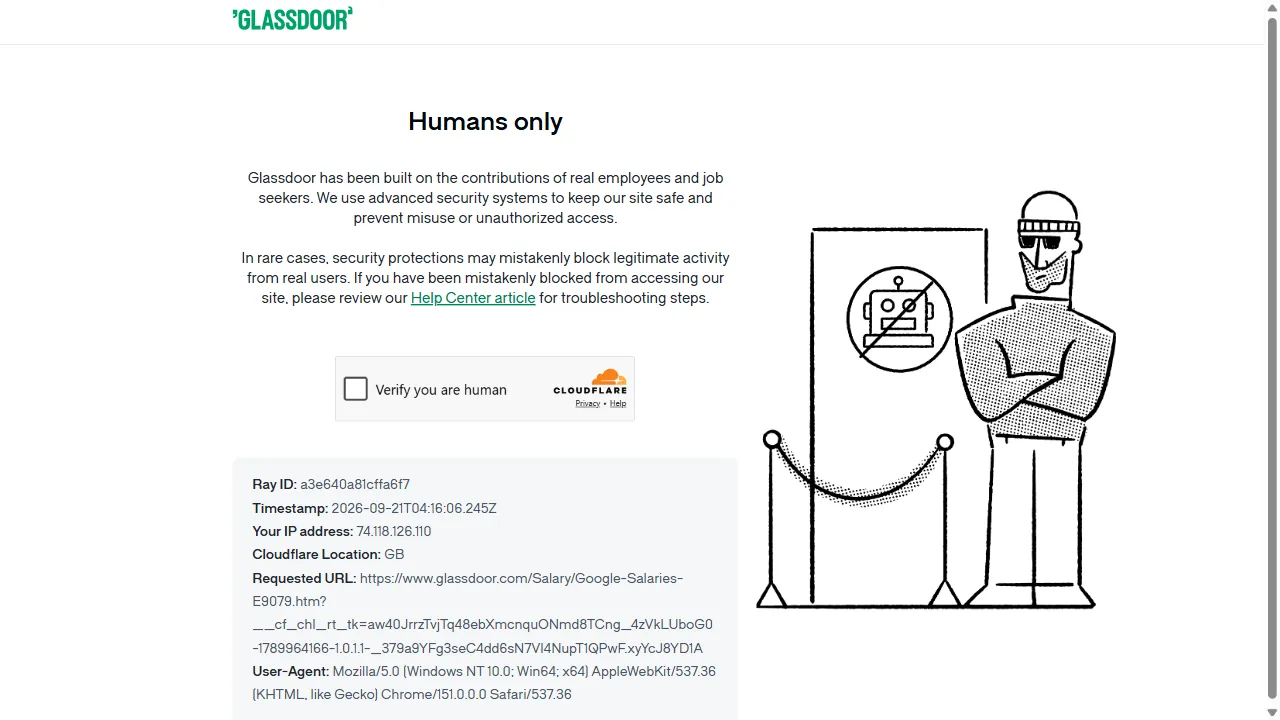 Figure: Cloudflare challenging Bare Playwright traffic on Glassdoor
In the other 18 runs, repeated attempts from the same unproxied connection triggered an escalated response. Instead of the normal Turnstile check, Capterra served a Cloudflare block page stating “Sorry, you have been blocked”.
 Figure: Cloudflare blocking Bare Playwright traffic on Capterra
StockX, on the other hand, served a login gate stating “Please log in to verify you are not a bot. If you are looking to access data through our API, please visit our developer portal.”
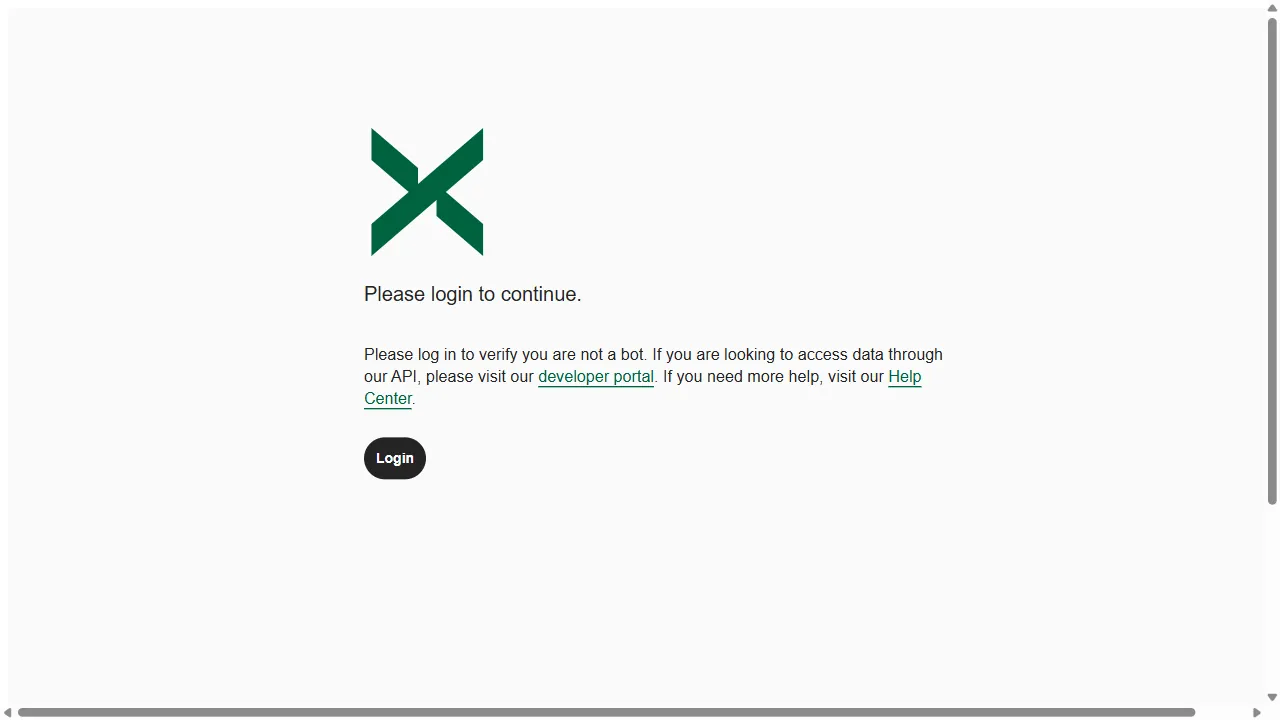 Figure: StockX login gate shown to Bare Playwright
Because bundled Chromium uses standard BoringSSL, it passes Cloudflare’s transport-level TLS checks. However, once Cloudflare executes client-side JavaScript, it catches exposed automation properties like navigator.webdriver and missing Chrome plugins, blocking the session before target content renders.
Playwright Stealth with a Residential Proxy
We upgraded Bare Playwright by adding Patchright, which patches Chromium at the driver level to hide automation flags. Those patches need updating whenever Chrome or the anti-bot changes; we explain why we stopped chasing them in Tired of Patching Playwright. We paired it with installed Google Chrome (channel="chrome"), native viewport dimensions (no_viewport=True), and a sticky residential proxy session.
from patchright.sync_api import sync_playwright

with sync_playwright() as p:
    context = p.chromium.launch_persistent_context(
        user_data_dir="./profiles/stealth",
        channel="chrome",
        headless=False,
        no_viewport=True,
        proxy={
            "server": "http://proxy.example.com:8000",
            "username": "user",
            "password": "password",
        },
    )
    context.set_default_navigation_timeout(120_000)
    page = context.new_page()
    page.goto(target_url, wait_until="domcontentloaded", timeout=120_000)
Adding Patchright and a residential proxy increased page access from 5% to 58%. The setup loaded target content in 58 out of 100 runs, with 36 direct loads and 22 loads after clearing an initial Cloudflare challenge. Successful runs had a median access time of 4.1 seconds.
Performance split by target. On Capterra CRM, the setup loaded all 20 runs. It completed 19 out of 20 runs on both Glassdoor Google salaries and StockX White Thunder, totaling 58 successful loads across 60 attempts. Routing traffic through a residential IP and using installed Google Chrome prevented the HTTP 403 blocks and forced login gates we experienced in the Bare Playwright tests.
The setup failed on Indeed. Across 40 attempts on Indeed Google reviews (0/20) and Indeed Google company profile (0/20), it had zero successful loads. All 40 runs remained stuck on Cloudflare verification pages with interactive Turnstile checkboxes. The checkbox sits inside an iframe and a closed shadow root, which is why a driver-level patch can’t click it; we cover the mechanics in how to bypass Cloudflare Turnstile.
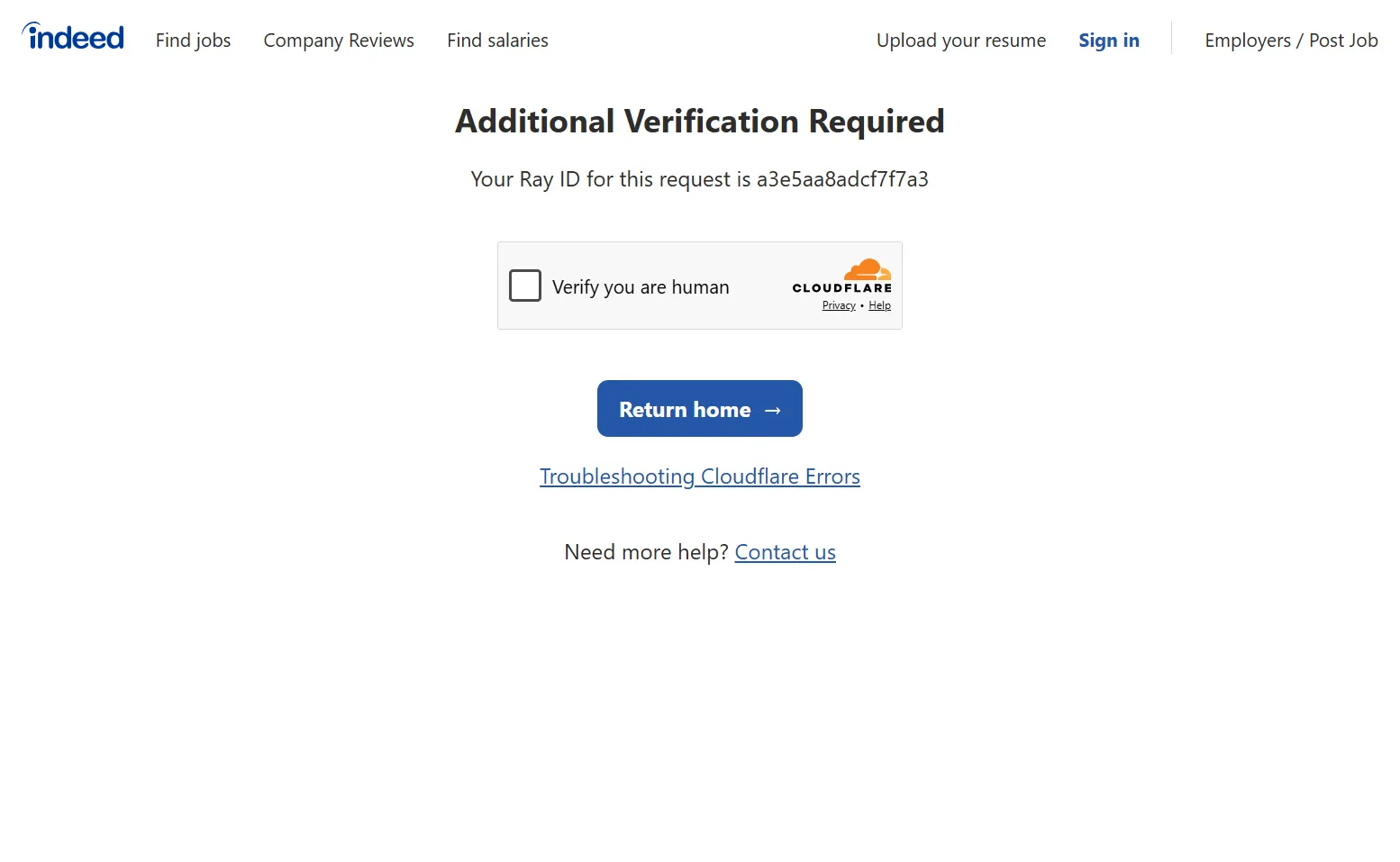 Figure: Cloudflare’s Turnstile checkbox blocking access to Indeed
The stealth setup was therefore unable to bypass Cloudflare on stricter targets that required solving interactive challenges.
How a Managed Browser Fares Against Cloudflare
For the managed-browser setup, we tested Surfsky’s managed cloud browser. Instead of running a browser binary locally, Playwright connected to a remote Chrome instance over the Chrome DevTools Protocol (CDP). Surfsky handled the browser environment, residential proxy routing, and session state on its cloud infrastructure, including automated Turnstile challenge handling.
from patchright.sync_api import sync_playwright

with sync_playwright() as p:
    browser = p.chromium.connect_over_cdp(ws_url)
    context = browser.contexts[0]
    context.set_default_navigation_timeout(120_000)
    page = context.new_page()

    cdp = context.new_cdp_session(page)
    cdp.send("Captcha.autoSolve", {"type": "turnstile"})

    page.goto(target_url, wait_until="domcontentloaded", timeout=120_000)
Surfsky achieved a 100% access rate across the benchmark, completing all 100 runs without a single block or timeout. Across the five targets, 54 runs loaded target content directly, while 46 runs loaded after clearing a Cloudflare verification challenge. The median access time across all successful runs was 6.9 seconds. This is higher than the 4.0 to 4.1 seconds recorded by the DIY setups. That difference comes from remote CDP connection overhead and the time the built-in CAPTCHA solver spends detecting and solving Turnstile challenges.
The managed browser loaded all 20 runs on each of the five targets. On Indeed Google reviews and Indeed Google company profile, where the DIY stealth stack was unable to get through, Surfsky completed 20 out of 20 runs on both endpoints.
Indeed Google review page:
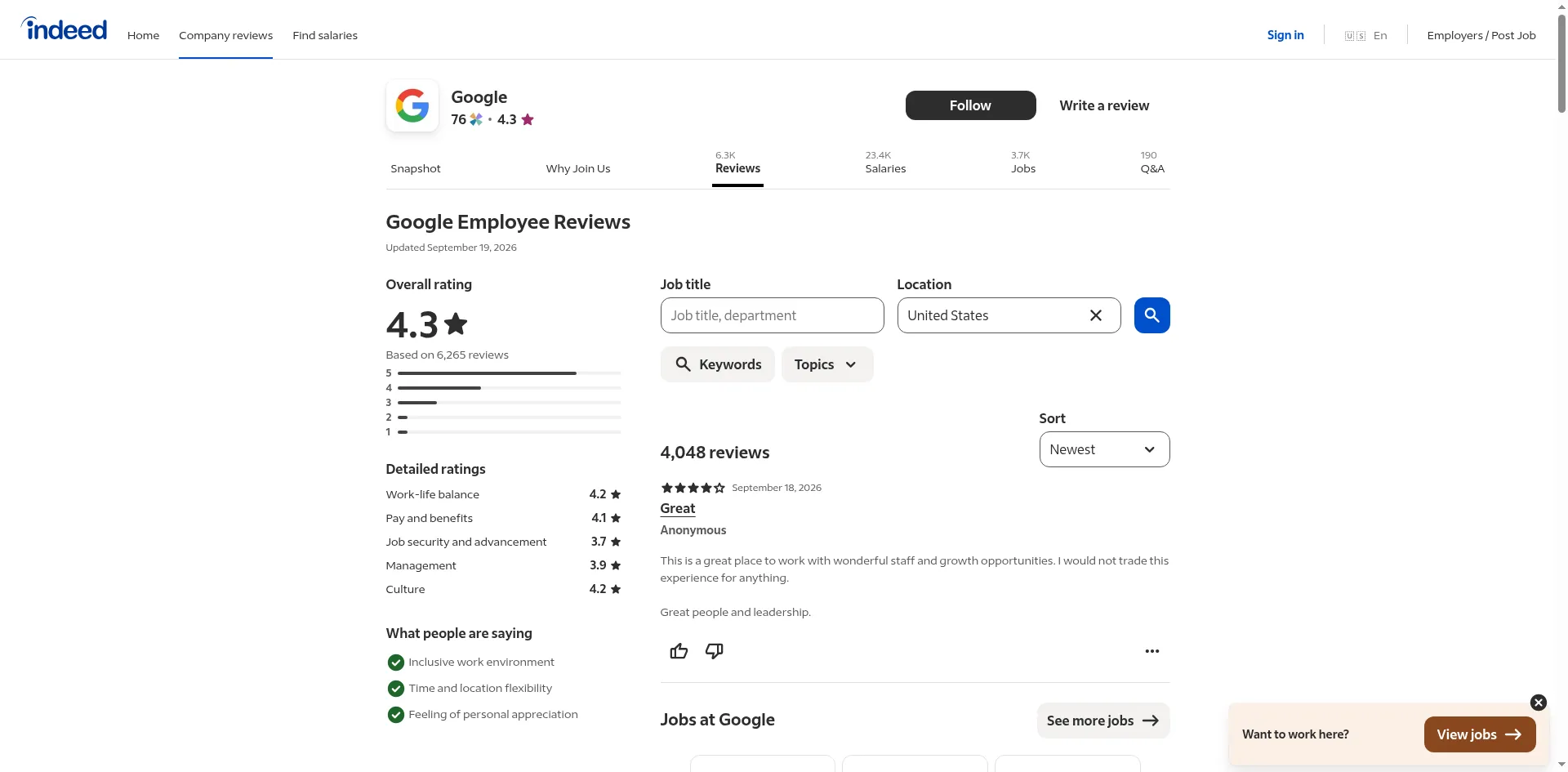 Figure: Indeed reviews page loading successfully via Surfsky
Indeed Google company page:
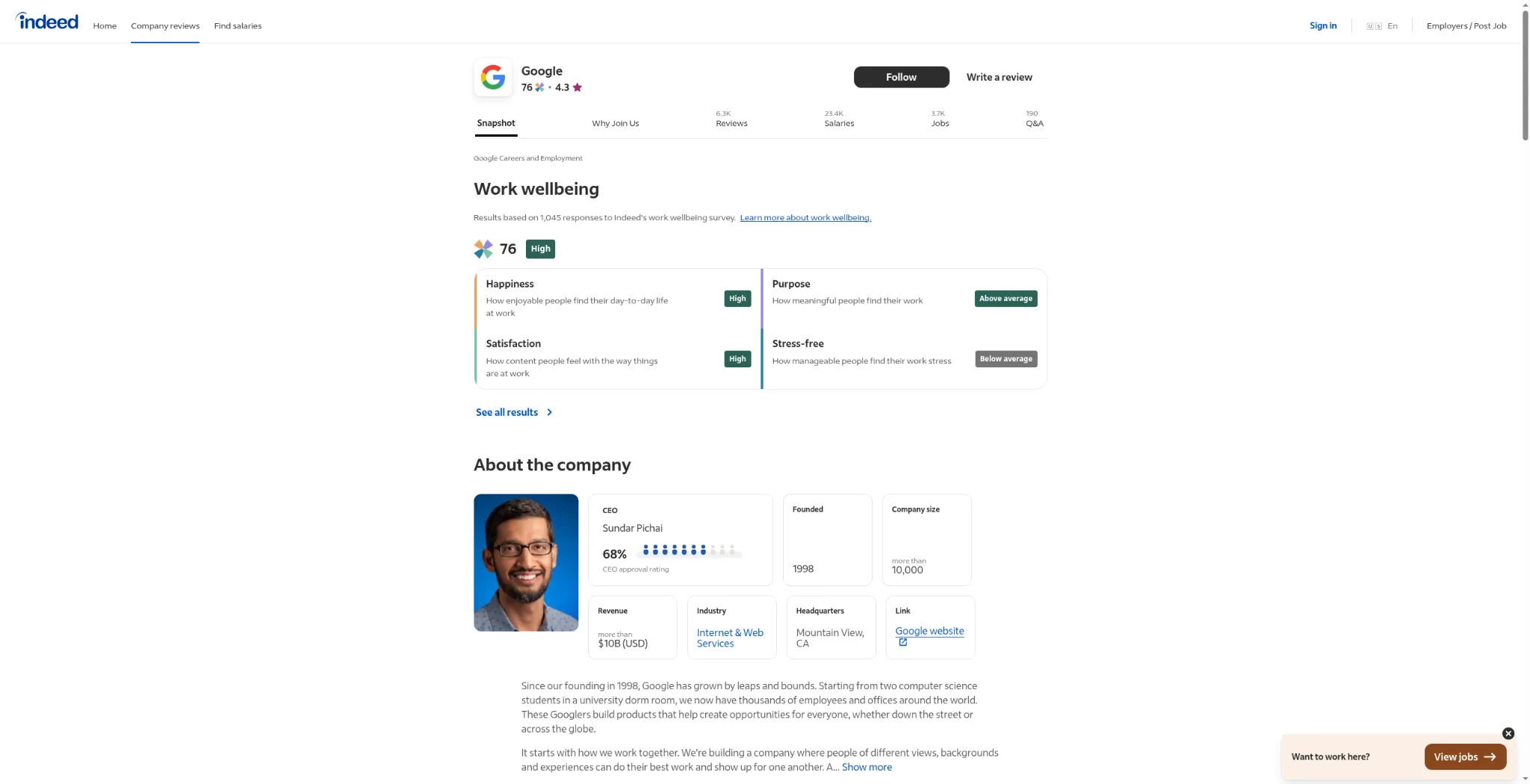 Figure: Indeed company profile loading successfully via Surfsky
It also loaded all 20 runs on Glassdoor Google salaries page, Capterra CRM, and StockX White Thunder. On StockX, every run encountered a Cloudflare challenge, but automated Turnstile solving cleared all 20 attempts. The same solver finished 10 of 10 Turnstile logins in our scraping API benchmark.
Bare Playwright vs DIY Stealth Stack vs Managed Browser: Results
Here is a snapshot of how all three setups performed across the five targets and 300 total runs.
| Metric / Feature | Bare Playwright | Stealth Playwright with a residential proxy | Managed browser (Surfsky) |
|---|---|---|---|
| Mode | Headed, persistent, bundled Chromium | Headed, persistent, Patchright + Chrome | Persistent remote browser |
| Network | No proxy | Residential proxy | Managed residential |
| Page access | 5% | 58% | 100% |
| Direct access (loaded) | 0 | 36 | 54 |
| After challenge (loaded after CF) | 5 | 22 | 46 |
| CF block | 95% | 42% | 0% |
| Indeed Google reviews | 0/20 | 0/20 | 20/20 |
| Indeed Google company | 1/20 | 0/20 | 20/20 |
| Glassdoor Google salaries | 0/20 | 19/20 | 20/20 |
| Capterra CRM | 2/20 | 20/20 | 20/20 |
| StockX White Thunder | 2/20 | 19/20 | 20/20 |
| Success median time | 4.0s | 4.1s | 6.9s |
| Turnstile Solver | No native support | No native support | Built-in |
| Developer Maintenance | Minimal setup, but unviable for protected targets | High (proxy rotation, fingerprint updates, session state, etc) | Low (managed browser, residential IPs, and challenge solver included) |
Where each setup broke
The difference between DIY setups and a managed browser is infrastructure overhead and reliability.
With DIY setups, you own the entire pipeline. You have to rotate residential proxies, patch browser fingerprints, and build custom solvers when interactive challenges appear. A managed browser takes over browser updates, proxy health and challenge solving. You connect over CDP and write the scraping code.
Conclusion
Whether you can bypass Cloudflare depends on how strictly a target configures its defenses. Bare Playwright gets blocked almost immediately, since it leaves every signal exposed. A DIY stealth stack with residential proxies bypasses Cloudflare on moderately protected targets. But it’s still blocked on targets that enforce stricter Cloudflare protections, like an interactive Turnstile challenge. Running the stack reliably also requires continuous maintenance across proxy pools and driver updates as anti-bot rules shift.
A managed browser like Surfsky automatically handles browser environments, residential IP rotation, and other fingerprinting checks in the cloud, and comes with built-in CAPTCHA solving for the challenges those checks trigger. What’s left for you is the extraction code.