In this post I’ll show how PerimeterX (HUMAN Security) detects bots: what data its script collects from the browser, how it recognizes automation tools, and how we get past it with Surfsky.
It started with a support case. A customer’s scraper kept getting PerimeterX’s press-and-hold check, and while we looked for the cause, I decoded the script.
Spotting PerimeterX
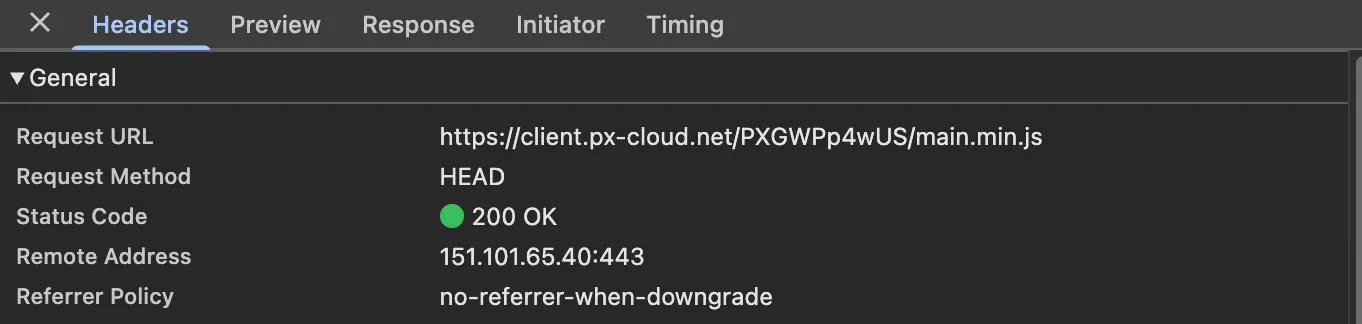
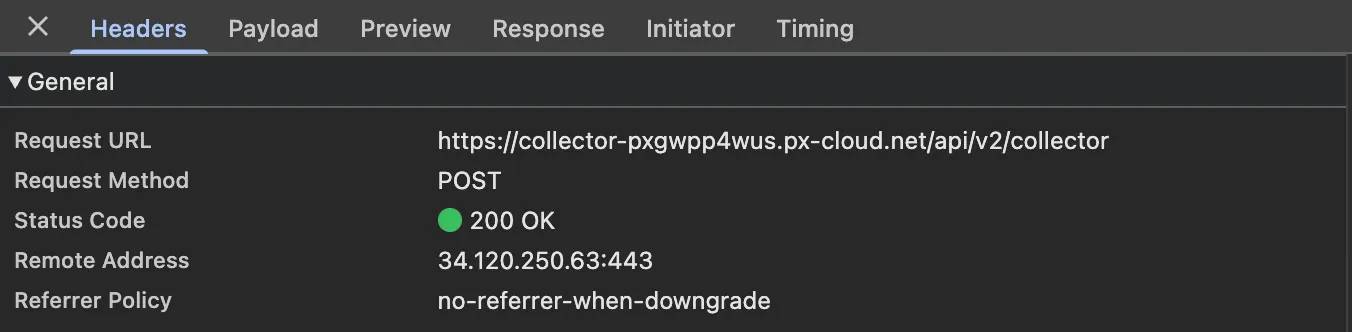
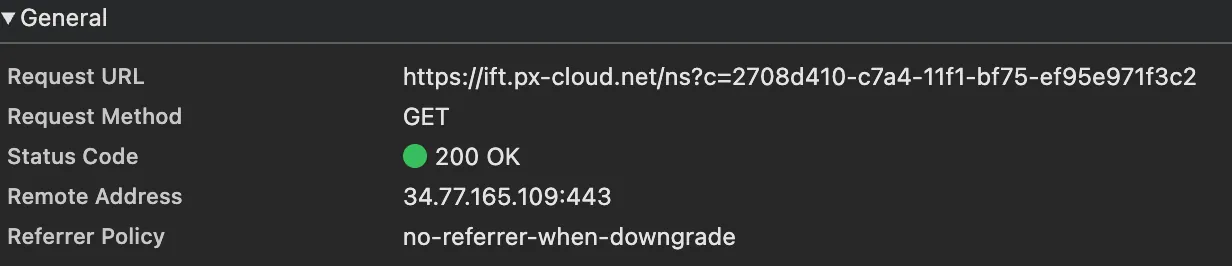
First, let’s check whether a site uses PerimeterX at all. Open DevTools on the page and look at the Network panel. A protected page makes a few requests to PerimeterX hosts:
GET client.px-cloud.net/<app_id>/main.min.js, the script itself:
POST collector-<app_id>.px-cloud.net/api/v2/collector, the endpoint that receives the collected data:
GET ift.px-cloud.net/ns, a small probe whose timing the script reports:
The page also sets cookies named _px2, _px3 and so on.

If you see these, the site runs PerimeterX (HUMAN Security).
Reversing the script
I opened main.min.js in the Sources panel of DevTools and pretty-printed it. A search for playwright, puppeteer and similar names found nothing, because most strings are hidden behind function calls, like in this line:
vs = [
  lh("ZHJpdmVyLWV2YWx1YXRl"),
  lh(jH(287)),
  lh(jH(288)),
  lh(jH(289)),
  lh(jH(290)),
  lh(jH(214)),
];
To find out what lh and jH do, I searched for their definitions. lh is one line:
function lh(t) {
  return lf === kY ? ld(t) : lm(t);
}
The variables it compares are set a bit earlier in the file:
kY = "function", kZ = window, … ld = kZ.atob, … lf = jI(ld)jI is a typeof helper, so lh checks whether the browser has atob. If it does, lh is just atob, and lm is the script’s own base64 decoder for browsers that don’t. So the first name is plain base64, and ZHJpdmVyLWV2YWx1YXRl is driver-evaluate.
The other 5 go through jH first. The name jH is reused for a few local helpers, but only one takes a single number:
function jH(t) {
  return void 0 === jF[t] ? (jF[t] = jD(jG[t])) : jF[t];
}
It takes entry t of the array jG, decodes it with jD and keeps the result in jF, so each string is decoded only once. jG is a long array of unreadable strings at the top of the file. jD is defined right above jH:
function jD(t) {
  for (
    var n = "" + (t || ""), e = n.length, r = [], o = 0, i = 0, a = -1, c = 0;
    c < e;
    c++
  ) {
    var j =
      '&,"_LPC:hlHV4;6!Y=<1%Qjc*>d#Ar{[T)bZi0Jq@tX`R3By9f$+sW~Duz}M|IS/novgeGE.F8wx2(pU7k?aKNm]5O^'.indexOf(
        n[c],
      );
    if (-1 !== j)
      if (a < 0) a = j;
      else {
        ((o |= (a += 91 * j) << i), (i += (8191 & a) > 88 ? 13 : 14));
        do {
          (r.push(255 & o), (o >>= 8), (i -= 8));
        } while (i > 7);
        a = -1;
      }
  }
  return (a > -1 && r.push(255 & (o | (a << i))), jP(r));
}
It looks up each character in a string of 91 characters, turns every pair of characters into 13 or 14 bits and cuts the bits into bytes, which jP turns into text. That’s base91 with its own alphabet.
To check, I put a breakpoint on the vs=[…] line and reloaded the page. While the script is paused there, the console can call its functions:
lh("ZHJpdmVyLWV2YWx1YXRl"); // "driver-evaluate"
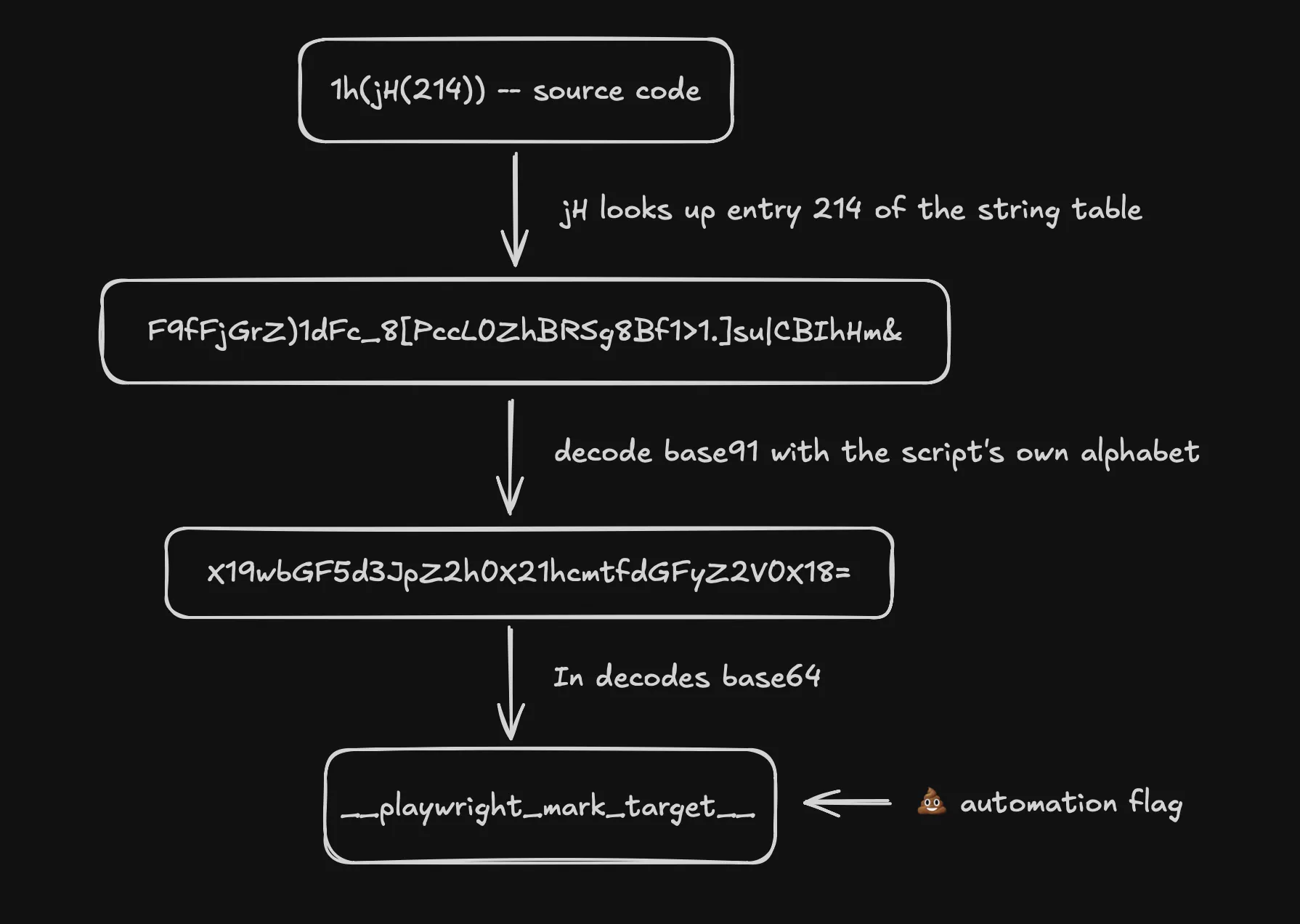
jH(214); // "X19wbGF5d3JpZ2h0X21hcmtfdGFyZ2V0X18="
lh(jH(214)); // "__playwright_mark_target__"
Entry 214 is encoded twice, first with base91 and then with base64. The other entries in the line decode to events of old Selenium-era drivers, such as webdriver-evaluate, so the whole line is a list of events the script listens for. The Playwright one is fired by Playwright itself: every click, fill or expect dispatches __playwright_mark_target__ on the element it found, so a page that listens for it knows Playwright is at the wheel.
The whole chain as a diagram:
Calling the functions one by one in the console is slow, so I wrote a simple script that restores all the strings at once. Function names like lh and jH change with every build, and we saw 3 builds in 2 days, so it finds the string table without relying on names. Part of its output, encoded string on the left, decoded on the right:
X19zZWxlbml1bV9ldmFsdWF0ZQ==                  __selenium_evaluate
cHVwcGV0ZWVy                                  puppeteer
]3IXA#,bMU!Rl=W{,TU@cIkF2#QqoS;2w~&i#d0jr...  $cdc_asdjflasutopfhvcZLmcfl_
$b3v9RU~;,0,BR~C[sqrpX.|+0X~)SG2(+v@jdN1r...  [data-browser-use-highlight]
x$djz]IMgnt|HetZ                              userAgentData
aGFyZHdhcmVDb25jdXJyZW5jeQ==                  hardwareConcurrency
::`D`8)iX#.N2S:                               deviceMemory
&:%*ITo2@0WAF                                 getBattery
KKPmrktMK=>                                   toDataURL
aXNUcnVzdGVk                                  isTrusted
The strings fall into two groups. Names of browser properties and functions show what the script reads from the browser. Names that automation tools leave in a page show what it looks for. Both come back in Which signals matter most.
How the data is collected
Decoding the strings showed what the script can read from the browser. It didn’t show what the script actually sends to HUMAN’s server, what the server answers, or how many requests the exchange takes. For that I had to watch the traffic.
The PerimeterX script sends everything to collector-<app id>.px-cloud.net/api/v2/collector. To catch it, I wrote a second script that opens a page in a Surfsky browser, records every POST to the collector together with the answer, and decodes both. On a protected page there were 4 POSTs in the first 30s, with 16, 219, 15 and 77 values. This is what each one carries:
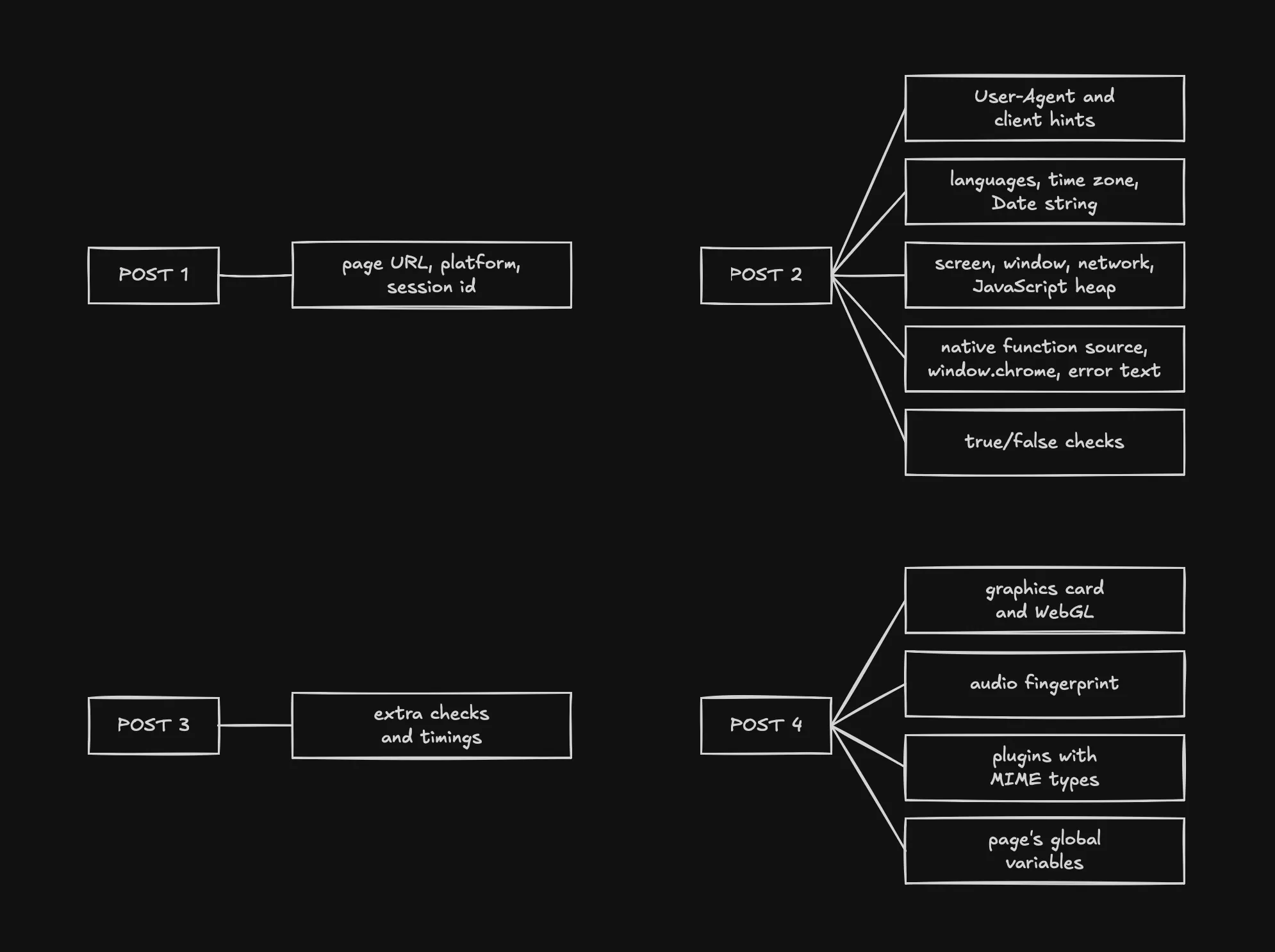
You might wonder why the script sends 4 requests instead of 1 🤔. I think it’s about timing. The first POST goes out right away with almost nothing in it, and its answer brings back tokens that the second POST has to include, so the script can’t send everything in one go. The fourth POST comes about 30s after the page loads and carries the slow measurements. WebGL and the audio fingerprint take time to render, and the page’s global variables are only complete once the site’s own scripts have run. Sending them last keeps the page fast.
Each request is an ordinary form, and the data sits in its payload field: the collected values as JSON, every character XORed with 50, then base64, with 20 extra characters spliced in at positions computed from the session id. Take them out, decode, XOR back, and the first POST reads:
[
  {
    "t": "fWdOIzgMQxQ=",
    "d": {
      "KVsaX282Gmg=": "https://www.<site>.com/p/…",
      "RB53WgF3c28=": 0,
      "NS8Ga3BAB1E=": "Win32",
      "FU9mS1AsYnA=": false,
      "YGITZiUBF1w=": 1272,
      "WQsqDxxnKD4=": 1445,
      "EXNiN1cRZgc=": 0,
      "PkBNBHguTzY=": 3605,
      "EmwhaFcFIVI=": 3600,
      "LxEcFWl5ECI=": 1791975817237,
      "STs6fwxSNk0=": 1791975817249,
      "FU9mS1Mga38=": "e7cb4c90-c7be-11f1-96a8-356be185c449",
      "AWNyJ0QNcBE=": null,
      "EFIjFlU8ISE=": 0,
      "DzF8dUlZf04=": false,
      "VG5nahECZlg=": {
        "PX12738": 16,
        "PX12739": 0,
        "PX12740": 0,
        "PX12741": -1
      }
    }
  }
]
The keys are scrambled names that change with every build, so to tell what a field is I matched values instead. My script also asks the browser for its own User-Agent, client hints, languages, plugins, time zone, screen and graphics card, and looks for the same values in the payload. In the second POST, 28 of the 219 values matched, including these:
| Value | What the browser reports it as |
|---|---|
"Mozilla/5.0 (Windows NT 10.0; Win64; x64) … Chrome/155.0.0.0 Safari/537.36" | navigator.userAgent |
[{"brand": "Google Chrome", "version": "155"}, …] | navigator.userAgentData.brands |
"155.0.8059.40", "x86", "64" | client hints: full version, architecture, bitness |
["en-US", "en"] | navigator.languages |
["PDF Viewer", "Chrome PDF Viewer", …] | navigator.plugins |
"America/New_York" | the time zone |
"1920X1080" | the screen size |
In the fourth POST, "ANGLE (AMD, AMD Radeon RX 7700 XT (0x0000747E) Direct3D11 vs_5_0 ps_5_0, D3D11)" matched the graphics card WebGL reports. In other sessions with a different fingerprint, the same keys held other values, such as Asia/Tokyo for the time zone and an Intel card for the GPU.
Other values can’t be matched one to one, but they’re easy to recognize:
| Value | What it is |
|---|---|
"Wed Oct 14 2026 07:03:37 GMT-0400 (Eastern Daylight Time)" | the time zone again, as the full Date string |
{"effectiveType": "4g", "rtt": 100, "downlink": 1.55, "saveData": false} | navigator.connection |
7013787, 10382047, 4395630592 | JavaScript heap: used, total, limit |
["loadTimes", "csi", "app"] | what’s inside window.chrome |
"function share() { [native code] }" | the source text of a native function |
"TypeError: Cannot read properties of undefined (reading 'width')" | an error the script caused on purpose |
"rgb(0, 102, 204)" | a CSS color value |
"126.86972490181506", in the fourth POST | a number that looks like an audio fingerprint |
Which signals matter most
The decision itself happens on HUMAN’s servers, and the page only gets a hashed score back, so the rules stay hidden. What we can do is break the collected data down into detection vectors and think about how much each one could weigh.
This is how the pieces fit together, as far as I can tell:
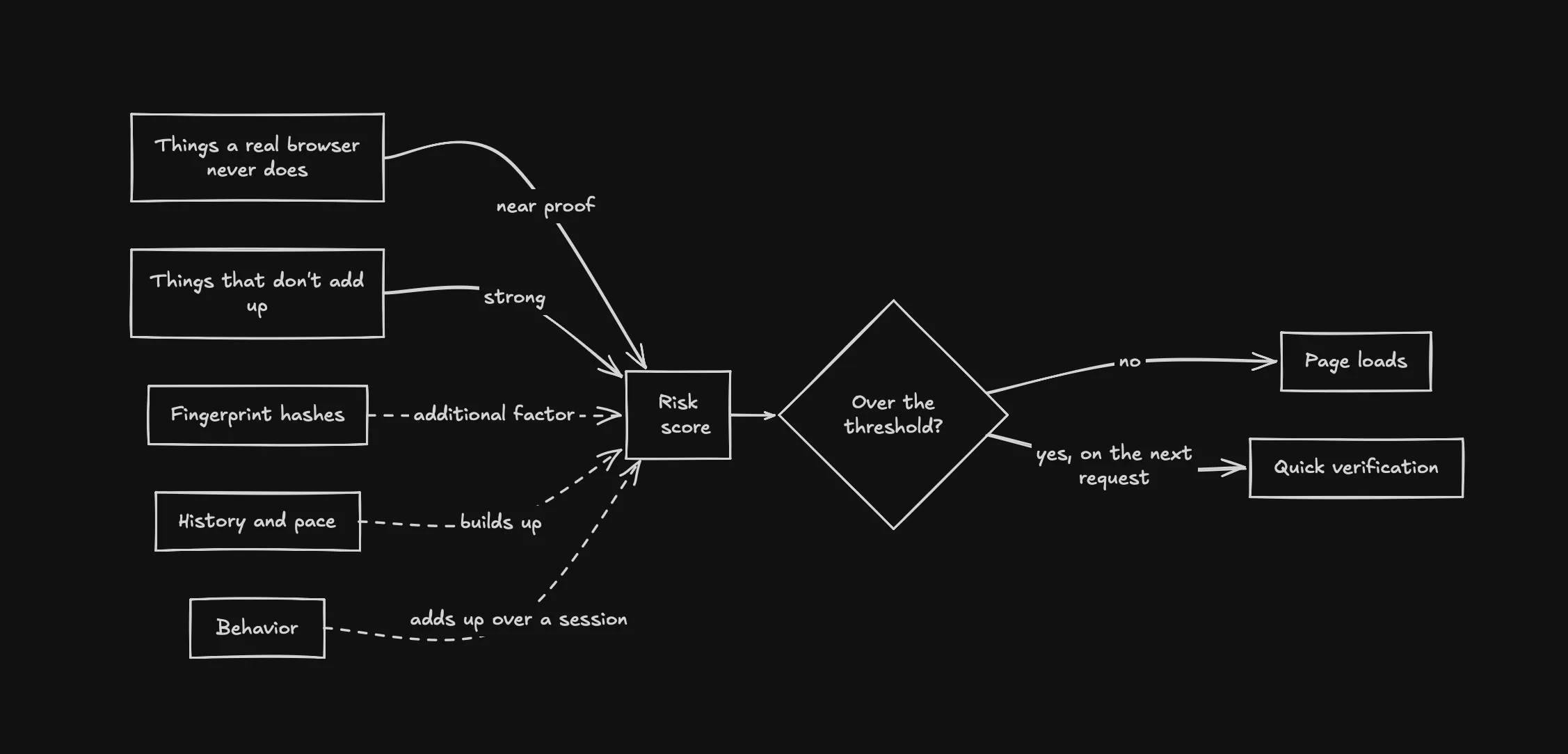
Not every value can carry the same weight. PerimeterX protects sites like online stores, and a false positive there is a real customer who can’t buy anything, so a signal that real browsers sometimes produce can’t decide on its own. That’s how I ranked the vectors: by how much one signal alone can prove.
Things a real browser never does. Besides the names drivers leave in a page, the script looks for side effects of the browser being controlled: traces of headless mode, input that didn’t come from real hardware, and events that frameworks fire while doing ordinary work, like Playwright’s. These are hard to hide, because they come from how the browser is run and controlled, not from a variable someone forgot to delete. So the way you control a browser matters more than how well you disguise it. A regular Chrome and a Surfsky browser controlled through our SDK send the same thing in the second POST: a run of false values, probably the results of these checks:
"bjAdNChYGQU=": false,
"GUtqT18lb3g=": false,
"ChQ5UE9+PmE=": false,
…
"AWNyJ0QOcRQ=": false
Things that don’t add up. The script collects the same facts through different paths: JavaScript APIs, HTTP headers, rendering, and the wording of errors it causes on purpose. A real browser is consistent across all of them, while spoofing usually fixes one path and forgets another. 3 hashes in the second POST, for example, are keyed with the User-Agent, so the one the script sees can be checked against the HTTP header. That’s why changing values one by one doesn’t work, and the whole set has to come from one real device. Privacy tools cause small mismatches too, so I’d expect these to raise the score rather than block on their own.
Fingerprint hashes. Canvas, WebGL and audio hashes are collected, but drivers change them, and Brave, Safari and Firefox all add noise to them in some modes, so an unfamiliar hash is normal for real users. I’d expect them to add to the score rather than decide it, and to link sessions: together with a visitor id that lasts a year, they let the server recognize a device and spot farms, where one fingerprint shows up from many IPs. That doesn’t mean a fingerprint has to be unique: many real devices share the same hashes, and one nobody has seen before stands out by itself.
History and pace. HUMAN’s code on the site’s server checks the current score on every request and blocks once it reaches a threshold, so a bad signal on one page shows up on the next. We see this pattern in our own runs: the first page loads fine, and the check comes on the next one. The server also sees the visitor id, the IP and the pace. Real people land on product pages straight from search, so one deep link means nothing, but dozens of product pages at a steady rate from a new visitor on a fresh IP probably do. The script also times a request to its own server, which could expose a proxy whose latency doesn’t match the IP’s location.
Behavior. On one page, missing input proves little: a phone has no cursor to move, and many visitors just look and leave. Over a session it adds up: identical pauses between pages, no scrolling, clicks that land without the cursor moving there. Judging by the decoded strings, the script listens for mouse, keyboard, scroll and touch events and checks whether each one came from real input. For a scraper that opens many pages, human-like input is a must, which is what Surfsky’s human behavior is for. Our capture had no input, so I couldn’t see this data.
How to bypass PerimeterX in 2026
Ideally you never see the press-and-hold check, and solving it is a last resort for the times it shows up anyway. Getting there depends on the browser and on how you use it.
What works for us, in the same order as the signals above, strongest first.
Control the browser without leaving traces. These signals matter most, because a real browser never produces them. Playwright fires its own events on ordinary calls, and most frameworks switch on CDP’s Runtime domain, which is a tell by itself. Stock headless Chrome adds its own: the User-Agent, the window sizes and the software graphics renderer. Our SDK leaves the Runtime domain off and does its reads in an isolated world the page can’t see. Clicks and typing go through the browser’s own input. A Surfsky browser reports its window and graphics card like a desktop Chrome, which is what our capture showed.
Below, one Surfsky browser on one proxy runs twice, first under Playwright and then under our SDK. Playwright reads a price and gets the check on the second page. The SDK opens the same pages and reads every price without one:
Use a fingerprint from a real device, set inside the engine. The script compares JavaScript, HTTP headers and rendering against each other and looks for patches made in JavaScript, so a fingerprint patched value by value fails. Take the whole set from one real device and apply it below the page. Surfsky collects fingerprints from real devices every day and applies them inside the browser engine, canvas spoofing included, and updates the browser as PerimeterX changes. Don’t chase uniqueness: a common real device is safer than a rare one, as long as one fingerprint doesn’t run in many sessions from different IPs at once. For a site you come back to, keep the same profile, so the fingerprint, cookies and visitor id stay together the way they do for a returning customer.
Stock Chrome on an M1 Max Mac next to a remote Surfsky browser with an M1 Max fingerprint. The canvas and WebGL hashes match, and so does every render hash PerimeterX sent:
Use residential proxies, and keep them sticky. The time zone, languages and Date string in the payload have to match where the IP is, and a Surfsky browser takes them from the proxy’s IP automatically. The IP itself counts too: datacenter ranges are easy to flag, so use residential proxies. Keep one IP for a whole session: an IP that changes on every request while the cookies stay the same is a pattern no real visitor has.
A session on our premium residential pool. All three values PerimeterX received match the exit IP, a home connection in Indianapolis in this run, and WebRTC shows no leak:

Pace your requests and move like a person. The SDK’s human behavior moves the cursor to an element before it clicks and types key by key, through the browser’s own input. On the same sign-in form, Playwright (left) jumps straight to the field, while our SDK (right) moves the cursor there along a curved path:
The pace is up to you. Vary the pauses between pages, scroll where a person would scroll, and don’t open the same pages in the same order in every session. Enter through search or a category page sometimes, not only through deep links. Spread the load over several profiles and proxies instead of pushing hundreds of pages through one session.
Solving the press-and-hold check
If the check shows up anyway, Surfsky has a solver for it. The button sits in an iframe inside a closed shadow root, where ordinary locators can’t reach it. The solver finds it through the DevTools protocol, without running any code on the page, and skips the decoy buttons PerimeterX hides in invisible iframes. Then it moves the cursor to the real button and holds until the progress bar fills and stops growing, because letting go even slightly early starts the hold over.
Getting started with Surfsky
If you want to try this on your own PerimeterX sites:
- Sign in at app.surfsky.io and get an API key.
- Connect the way you prefer: our SDK, Playwright, Puppeteer or any other CDP client. The quickstart covers each one.
- Open your pages and automate as usual.
If you’d rather have an AI coding agent set up a new project or add Surfsky to an existing one, give it our skill file.