An HTTP 200 response doesn’t necessarily mean your scraping tool worked. The page can be a challenge, or it can be missing the data you came for. So we counted a run as a pass only when it returned the data, and benchmarked a managed scraping API, Firecrawl, against two managed stealth browser services, Browserless and Surfsky.
Each one ran 80 times across five targets: an unprotected store page, sites behind Cloudflare, DataDome and Akamai, and a login form behind Cloudflare Turnstile. Surfsky passed 78 of its 80 runs, Firecrawl 69 and Browserless 62. Firecrawl was the fastest on the unprotected page and the cheapest per page, but it didn’t get through the Turnstile login once.
Key Takeaways
- Overall passes: Surfsky 78/80, Firecrawl 69/80, Browserless 62/80 across both configurations.
- Turnstile login: Surfsky and Browserless passed 10/10 (medians 17.05 s and 24.00 s); Firecrawl passed 0/10 at a 33.71 s median.
- Unprotected page: Firecrawl was fastest at 2.33 s and cheapest at an estimated $3.80 per 1,000 runs.
- Cost of stealth in time: Surfsky’s median rose 0.26 s, Firecrawl’s 4.80 s, Browserless’s 10.31 s.
- Surfsky’s 2 misses were proxy timeouts at 60 s, not anti-bot blocks.
Test Your Browser Stack for $5
Run your Playwright code through a real browser and see which requests pass.
- No card required
- API key in 30 seconds
- Change one line of code
Quick Comparison
| Approach | Total passes | Standard | Stealth | Turnstile login | Stealth median | Est. cost / 1,000 runs |
|---|---|---|---|---|---|---|
| Firecrawl | 69/80 | 40/40 | 29/40 | 0/10 | 10.36 s | $3.80 |
| Surfsky | 78/80 | 40/40 | 38/40 | 10/10 | 5.72 s | $26.84 (managed proxy) · $0.48 + your proxy (BYOP) |
| Browserless | 62/80 | 27/40 | 35/40 | 10/10 | 17.46 s | $32.52 |
Standard and Stealth don’t use identical target sets: Standard includes the unprotected page, Stealth includes the Turnstile login. Read the totals together with the per-target results below.
Scraping API vs. Stealth Browser: What’s the Difference?
A scraping API works request-in, data-out: you send a URL and get back HTML, markdown or JSON. A stealth browser gives your code a full browser session with a realistic fingerprint, so cookies, logins and multi-step forms carry over between actions.
The line blurs in practice. Firecrawl can run Playwright actions through its interact endpoint, and Browserless exposes HTTP endpoints like /unblock. What decides the fit is the workflow: a single page fetch suits an API, an interactive flow needs a session you control.
In this benchmark, Firecrawl is the managed scraping API, Browserless is managed browser and scraping infrastructure, and Surfsky’s managed cloud browser is stealth browser infrastructure.
Target Sites and Anti-Bot Systems
We selected targets that represent different scraping conditions. These include an unprotected page, websites using common bot protection systems, and an authenticated workflow protected by Cloudflare Turnstile.
| Target | Protection |
|---|---|
| ScrapingCourse Ecommerce Challenge | None |
| Indeed | Cloudflare |
| Leboncoin | DataDome |
| Foot Locker | Akamai |
| ScrapingCourse Turnstile Login | Cloudflare Turnstile |
We used the ScrapingCourse Ecommerce page as the unprotected baseline. This gives us a reference point for how each approach performs when a target doesn’t have anti-bot protection.
For protected targets, we used Indeed for Cloudflare, Leboncoin for DataDome, and Foot Locker UK for Akamai. Using different websites also helps avoid treating one site’s behavior as representative of the entire anti-bot ecosystem.
Cloudflare Turnstile is usually embedded in-page on form elements and doesn’t use an interstitial challenge page. We tested it separately using the ScrapingCourse Turnstile Login as the target. This was an interactive end-to-end workflow that involved handling the Turnstile protection attached to the form, submitting the form, and reaching the target destination dashboard before applying the same extraction and validation process.
Tested Approaches: Scraping API vs Managed Browsers
In this benchmark, an approach is the technology and execution model used to access the target and perform the extraction. All three approaches are managed services.
We tested three approaches:
| Approach | Architecture |
|---|---|
| Firecrawl | Managed scraping API |
| Browserless | Managed browser/scraping infrastructure |
| Surfsky | Managed stealth browser infrastructure |
Benchmark Methodology: Standard vs Stealth Configurations
We tested each approach against the same targets using the same extraction requirements. And for each target and approach combination, we performed 10 independent runs.
We recorded the benchmark outcome for every run, including successes and failures. We didn’t selectively retry or remove failures from the results.
The benchmark was split into two configurations:
- Standard: Benchmarked the approaches using their standard scraping/browser configurations across four targets: the e-commerce target, Leboncoin, Indeed, and Foot Locker.
- Stealth: Benchmarked configurations intended to handle targets with stronger bot protection or browser-based challenges across four comparison targets: the ScrapingCourse Turnstile Login workflow, Leboncoin, Indeed, and Foot Locker. We also tested the e-commerce target under the stealth configuration, but excluded those additional runs from the standard-versus-stealth comparison to keep both benchmark configurations at the same number of runs.
Here’s what each approach used in each configuration:
| Approach | Standard | Stealth |
|---|---|---|
| Firecrawl | Scrape API with proxy: "auto" |
Scrape API with proxy: "enhanced" |
| Browserless | /content on the baseline, /unblock with a residential proxy on the others |
BrowserQL /stealth/bql endpoint with a residential proxy |
| Surfsky | SDK browser with a premium proxy, a macOS fingerprint and the anti-captcha solver | Same as Standard |
Surfsky is an antidetect browser, so stealth is built in by design and there’s no separate mode to switch on. It used one configuration for both benchmarks, in two separate sets of runs. Its proxy was in the target’s country: the US for ScrapingCourse and Indeed, France for Leboncoin and the UK for Foot Locker. On the Turnstile login, Surfsky ran without the proxy because ScrapingCourse is a test site.
For each run, we recorded the target, approach, timestamp, execution time, response information, extraction result, and, where applicable, the failure reason. This gave us both the success rate and the underlying run-level data needed to examine reliability and performance across the targets.
In total:
- Standard benchmark: 3 approaches × 4 targets × 10 runs = 120 test runs.
- Stealth benchmark: 3 approaches × 4 targets × 10 runs = 120 test runs.
Success Criteria: Validated Data, Not HTTP 200
A scraping tool can receive a successful HTTP response while still returning a challenge page, incomplete content, or content that doesn’t contain the required data.
In our benchmark, a run passes only when the intended target content is reached, and the predefined data is successfully extracted and validated. So, an HTTP status 200 alone doesn’t count as success.
For the Turnstile benchmark, the success criteria also required the end-to-end login interaction flow to complete. We validated that an approach reached the Turnstile-protected form, accessed the authenticated dashboard, and extracted the required data.
Measured Metrics: Success Rate, Latency, Failure Type
To obtain an outcome-based view of the benchmark and the practical effort required to achieve that outcome, we evaluated the approaches using the following metrics:
- Success rate: The percentage of runs that meet the pass criteria.
- Extraction completeness and accuracy: Whether the expected records were successfully extracted and matched the predefined validation requirements.
- Execution time: The elapsed time from the start of an approach’s execution until the attempt completes, including approach-specific setup but excluding post-response cleanup.
- Reliability across repeated runs: How consistently an approach succeeds across independent runs under the same test conditions.
- Failure type and reason: The failure mode recorded when a run doesn’t meet the pass criteria, such as insufficient extraction, timeout, or another execution error.
Evidence and Reproducibility: Logs, HTML, Repository
We captured benchmark results at the individual-run level and retained output and supporting evidence for each execution. This lets us trace aggregate results back to the underlying requests, responses, extraction output, and validation results.
What We Recorded
For each run, we retained the relevant output produced by the approach, along with the information needed to identify and evaluate that execution. Depending on the approach, this includes:
- JSON logs: Run metadata, configuration, timing, response information, extraction results, validation status, and failure details.
- Returned HTML: The target HTML returned by scraping APIs or browser-based executions, where available.
- Extracted data: The records and fields produced by the extraction process and used for validation.
- Failure output: Error messages, timeout information, challenge responses, or other failure details returned by the approach.
Reproducing the Results
You should be able to reproduce the benchmark using the target URLs, extraction and validation rules, approach configurations, and test methodology described in this report.
The complete benchmark implementation is available in the following GitHub repository:
GitHub Repository: Scraping Benchmark
The repository contains the benchmark code, target configurations, extraction and validation logic, and the separate implementations used for the standard, stealth, and interactive Turnstile tests. The Turnstile workflow is maintained separately because it requires an end-to-end login interaction rather than simple page retrieval.
The repository also includes configuration files that define targets and benchmark parameters. This allows you to inspect the exact target configurations, extraction selectors, validation rules, and approach-specific settings used in the benchmark, as well as the code used to run each test.
Results by Approach: Success Rate and Median Latency
Overall Success Rate: Standard vs. Stealth
The change in success rate between the two configurations wasn’t distributed evenly across the approaches.
| Approach | Standard | Stealth | Change |
|---|---|---|---|
| Firecrawl | 40/40 (100%) | 29/40 (72.5%) | −27.5 pp |
| Surfsky | 40/40 (100%) | 38/40 (95%) | −5 pp |
| Browserless | 27/40 (67.5%) | 35/40 (87.5%) | +20 pp |
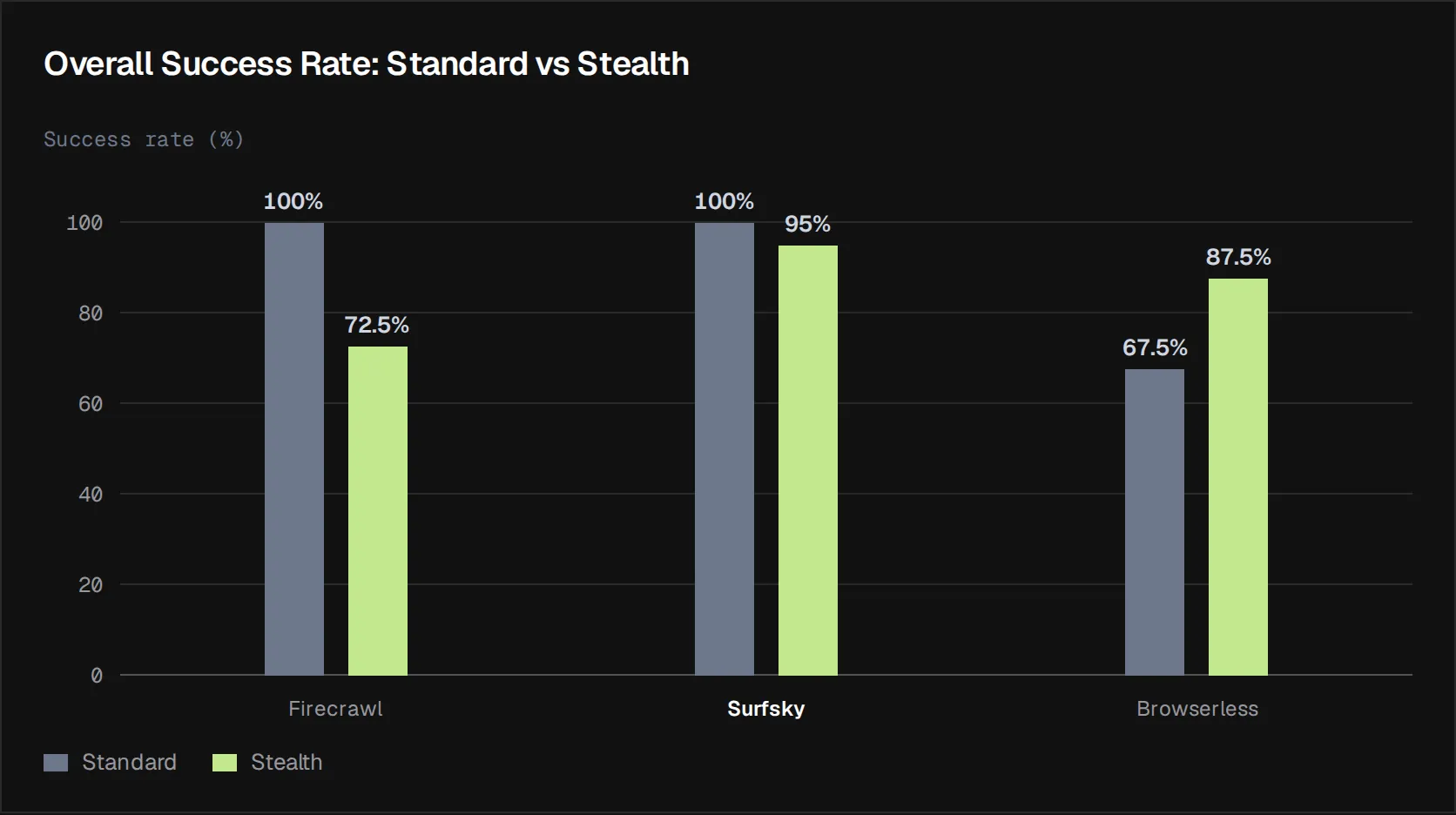
Firecrawl moved from a perfect standard result to 29 successful runs in the stealth configuration, while Browserless improved from 27 to 35 successful runs. Surfsky moved from 40 to 38 successful runs.
The change in target composition helps explain some of this variation. The stealth configuration included the ScrapingCourse Turnstile Login workflow, which introduced an interactive Cloudflare Turnstile challenge that wasn’t present in the standard benchmark. This additional challenge made the workflow more demanding for approaches that could handle the other protected targets but couldn’t consistently complete the Turnstile interaction.
Execution Time: Standard vs. Stealth
We measured execution time using the elapsed time recorded for each run. The table below uses the median elapsed time for each approach because individual runs can contain unusually slow executions that would disproportionately affect an average.
| Approach | Standard median | Stealth median | Change |
|---|---|---|---|
| Firecrawl | 5.56 s | 10.36 s | +4.80 s (+86.5%) |
| Surfsky | 5.46 s | 5.72 s | +0.26 s (+4.8%) |
| Browserless | 7.15 s | 17.46 s | +10.31 s (+144.2%) |
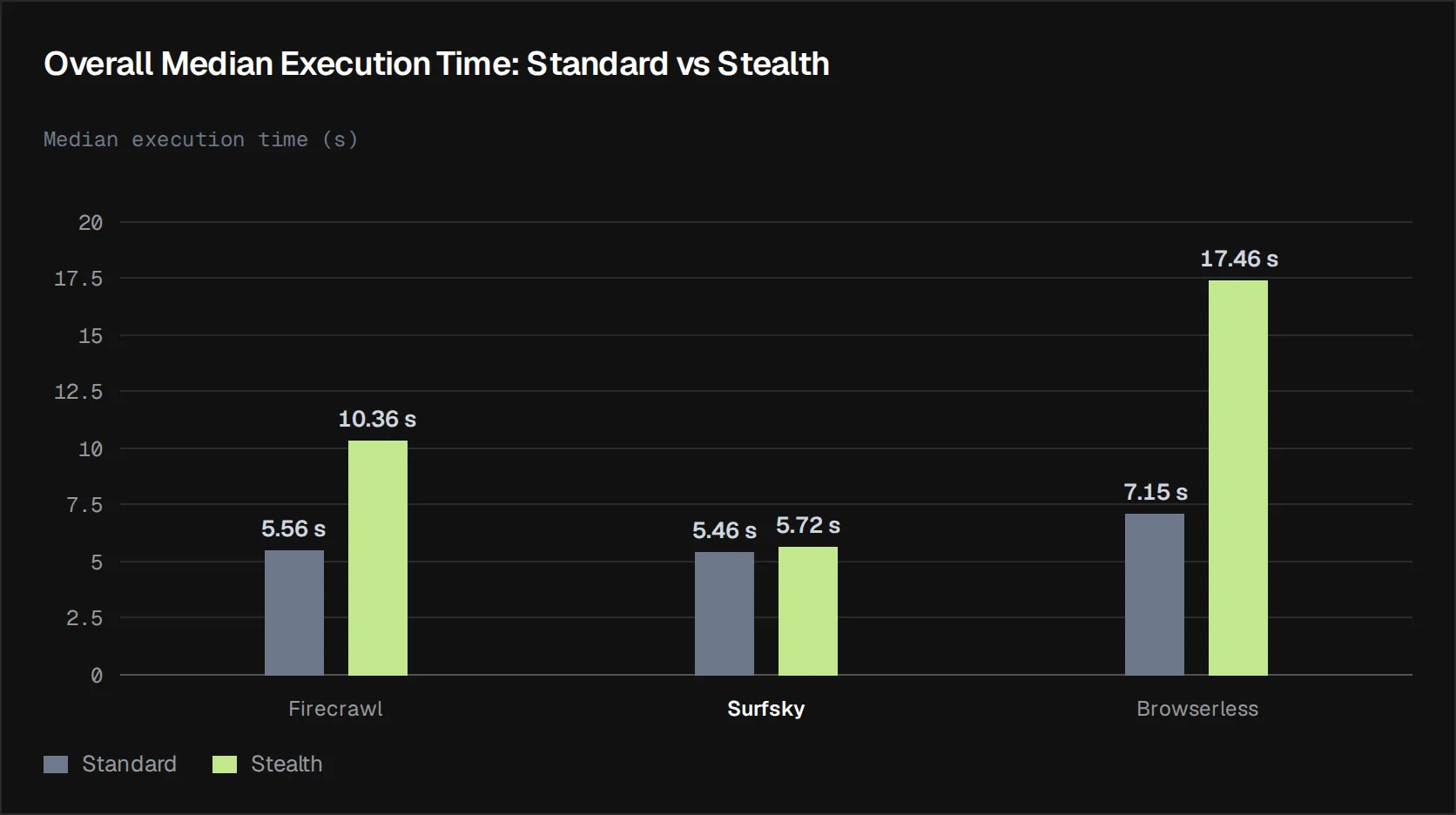
Surfsky’s median rose by about a quarter of a second. Firecrawl’s nearly doubled and Browserless’s more than doubled, so the stealth configurations cost the other two services real time, and only Browserless got more passes for it.
Firecrawl
Firecrawl completed all 40 standard runs successfully, giving it a 100% success rate. In the stealth configuration, it completed 29 of 40 runs, reducing its success rate to 72.5%. As noted above, the reduction was largely driven by the introduction of the Turnstile Login workflow, which Firecrawl failed to complete in all 10 runs.
Its median elapsed time also increased substantially, from 5.56 seconds in the standard configuration to 10.36 seconds in the stealth configuration, an increase of approximately 4.8 seconds. The extra time didn’t buy reliability. Its slowest target was the Turnstile login, at a median of 33.71 seconds, and it never completed it.
Surfsky
Surfsky completed all 40 standard runs, giving it a 100% success rate. In the stealth configuration, it completed 38 of 40 runs, a 95% success rate. Its median elapsed time moved from 5.46 seconds to 5.72 seconds, an increase of about 0.26 seconds, and it recorded the lowest median of the three approaches in both configurations.
Surfsky used the same setup in both benchmarks, since its stealth is built into the browser. Its two stealth misses, one on Indeed and one on Foot Locker UK, were proxy timeouts rather than detection. In both runs, the page never finished loading through the proxy within 60 seconds, and no challenge or block page came back from the anti-bot system.
Why one setup held across every target: Surfsky runs a Chromium build that tracks current stable releases, with fingerprint consistency patched in the browser’s C++ source rather than injected through JavaScript overrides. JavaScript-level patches leave traces that anti-bot scripts can probe; source-level changes don’t add that surface. Our team continuously analyzes how Cloudflare, DataDome, Akamai and other systems fingerprint browsers, and ships updates to the build, so the stealth layer isn’t something you tune per target.
The stealth benchmark therefore didn’t introduce a meaningful performance penalty for Surfsky. Its median stayed close to the standard result even with the interactive Turnstile workflow included.
Browserless
Browserless completed 27 of 40 standard runs, giving it a 67.5% success rate. In the stealth configuration, it completed 35 of 40 runs, increasing its success rate to 87.5%, an improvement of 20 percentage points.
This improvement came with a substantial increase in execution time. Its median elapsed time increased from 7.15 seconds to 17.46 seconds, an increase of approximately 10.3 seconds. The additional stealth configuration therefore improved Browserless’s ability to complete the protected targets, but at a considerable execution-time cost.
Failure Modes Observed
A timeout, a challenge page and an incomplete extraction need different fixes, so failures matter as much as pass rates.
| Approach | Failed runs (Standard / Stealth) | Where they failed | Recorded cause |
|---|---|---|---|
| Firecrawl | 0 / 11 | Turnstile login (10), Indeed stealth (1) | Turnstile: the dashboard was never reached through the interact endpoint |
| Surfsky | 0 / 2 | Indeed stealth (1), Foot Locker UK stealth (1) | Proxy timeout at 60 s; no challenge or block page returned |
| Browserless | 13 / 5 | Indeed standard (10), Leboncoin (3 / 2), Foot Locker UK stealth (3) | Per-run reasons are in the repository logs |
Firecrawl’s stealth failures cluster on the one interactive workflow. Browserless’s depend on the endpoint: /unblock failed every Indeed run, BrowserQL passed all of them.
Results by Target: Cloudflare, DataDome, Akamai, Turnstile
Here’s how each approach did on each target, with standard and stealth side by side where both ran.
Unprotected Baseline (ScrapingCourse)
The ScrapingCourse Ecommerce page has no bot protection, so it shows each approach’s speed with nothing in the way.
As expected, all three approaches achieved a 100% success rate across the 10 runs on this target.
| Approach | Success rate | Median execution time |
|---|---|---|
| Firecrawl | 100% | 2.33 s |
| Browserless | 100% | 4.51 s |
| Surfsky | 100% | 5.69 s |
While success rate didn’t distinguish the approaches, the median execution times did. Firecrawl recorded the lowest median time at 2.33 seconds, followed by Browserless at 4.51 seconds. Surfsky recorded a higher median time of 5.69 seconds.
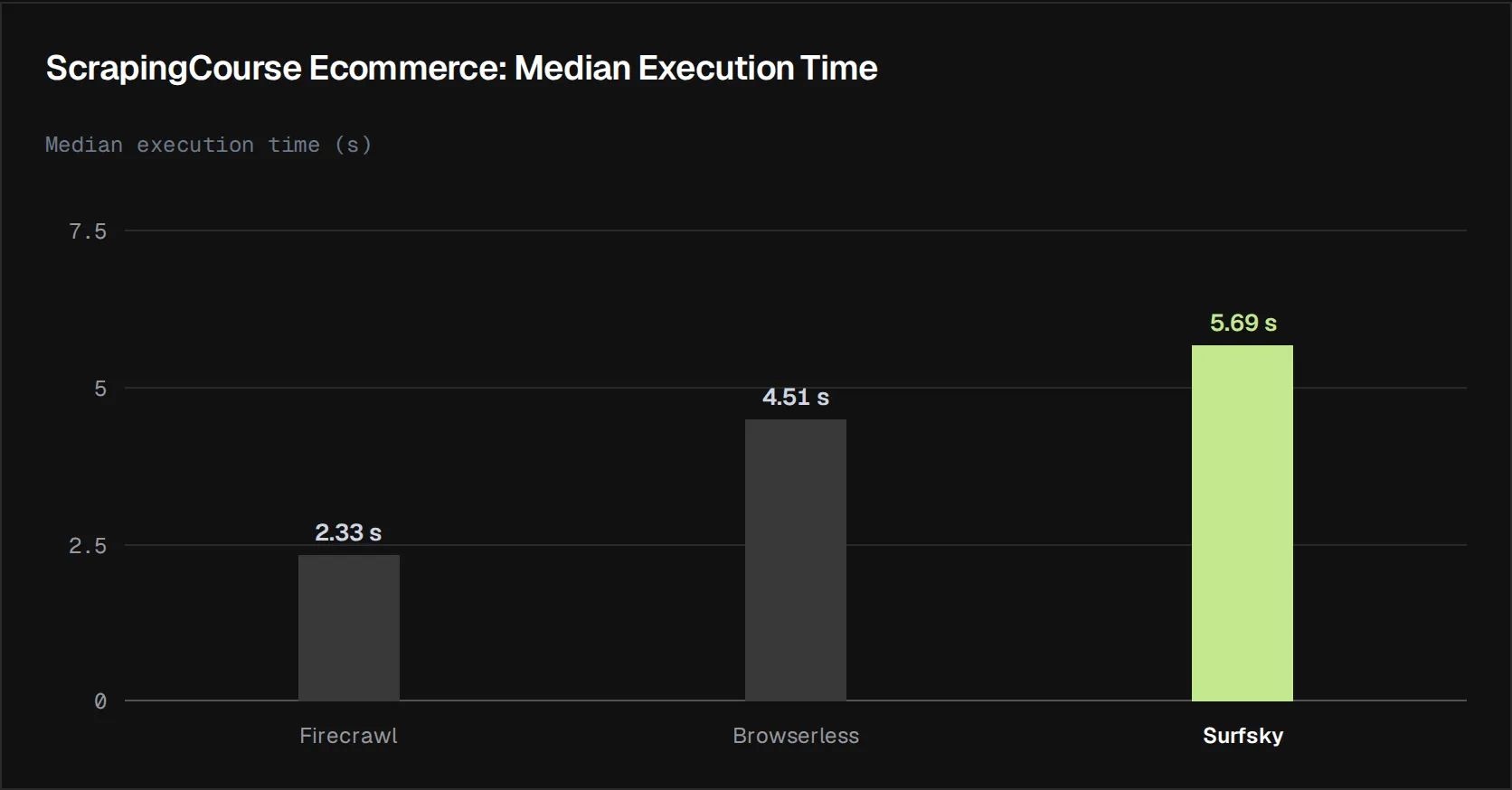
On the protected targets, speed only counts when the run also returns the data.
Cloudflare (Indeed)
Indeed sits behind Cloudflare. Here the stealth configuration changed the result more than on any other target.
| Approach | Standard success rate | Standard median time | Stealth success rate | Stealth median time |
|---|---|---|---|---|
| Firecrawl | 100% | 10.90 s | 90% | 11.78 s |
| Browserless | 0% | 2.45 s | 100% | 18.22 s |
| Surfsky | 100% | 5.91 s | 90% | 5.72 s |
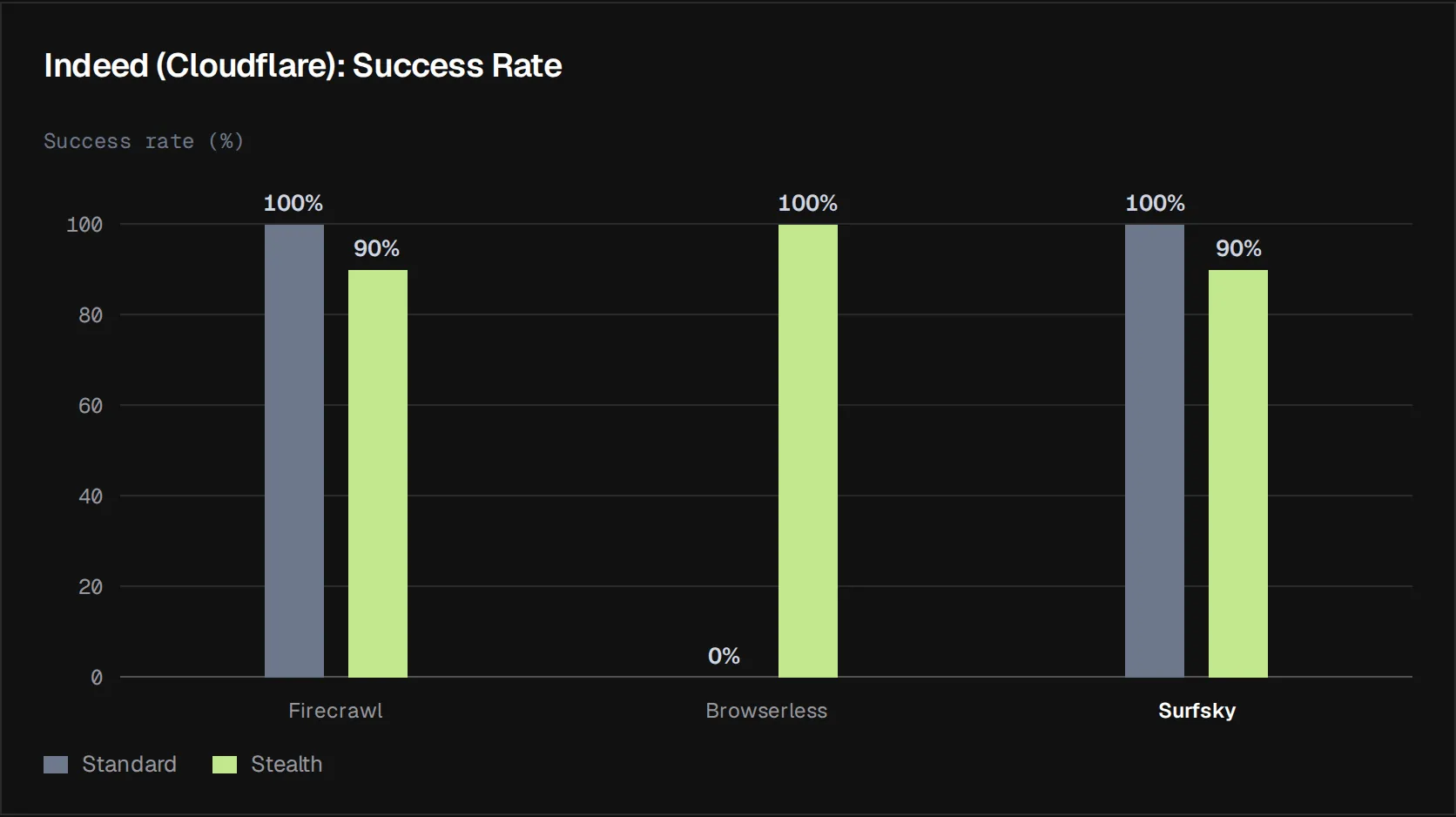
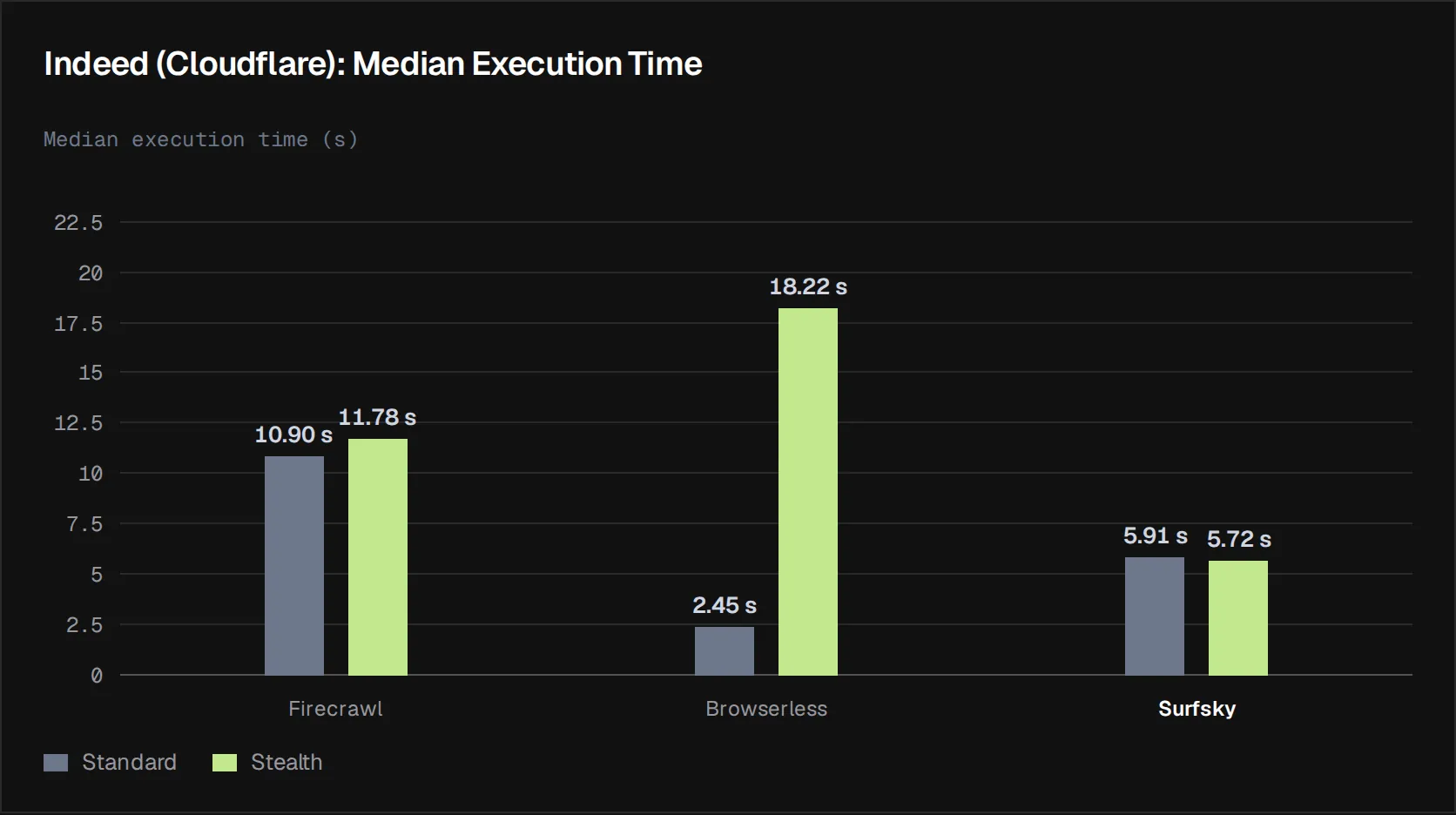
Browserless is the most notable case. Its standard configuration produced no successful extractions, yet the stealth configuration completed the target successfully in every run. The improvement came with a significant increase in execution time, suggesting the additional browser capabilities did meaningful work rather than simply adding overhead.
Surfsky’s result didn’t depend on the configuration, since it ran the same setup in both benchmarks. It passed all 10 standard runs with a median of 5.91 seconds and 9 of 10 stealth runs at 5.72 seconds. Its one stealth miss was a proxy timeout: the page didn’t finish loading within 60 seconds, and Cloudflare never returned a challenge or block page.
Firecrawl barely changed: 10 of 10 passes in standard, 9 of 10 in stealth, and under a second slower.
DataDome (Leboncoin)
Leboncoin sits behind DataDome. Firecrawl and Surfsky passed every run in both configurations, so here the difference is in time.
| Approach | Standard success rate | Standard median time | Stealth success rate | Stealth median time |
|---|---|---|---|---|
| Firecrawl | 100% | 3.36 s | 100% | 7.91 s |
| Browserless | 70% | 15.69 s | 80% | 17.02 s |
| Surfsky | 100% | 4.85 s | 100% | 5.14 s |
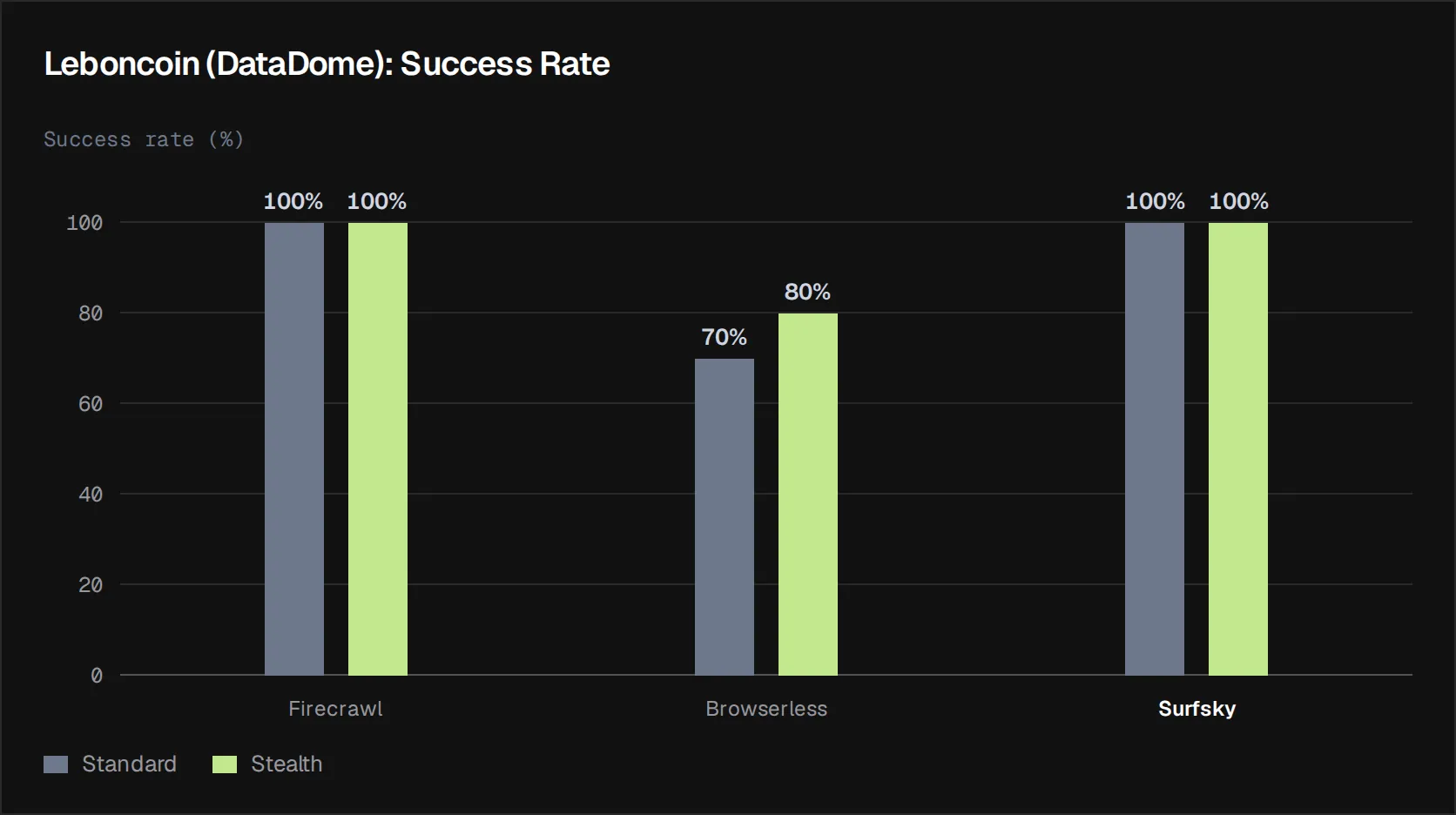
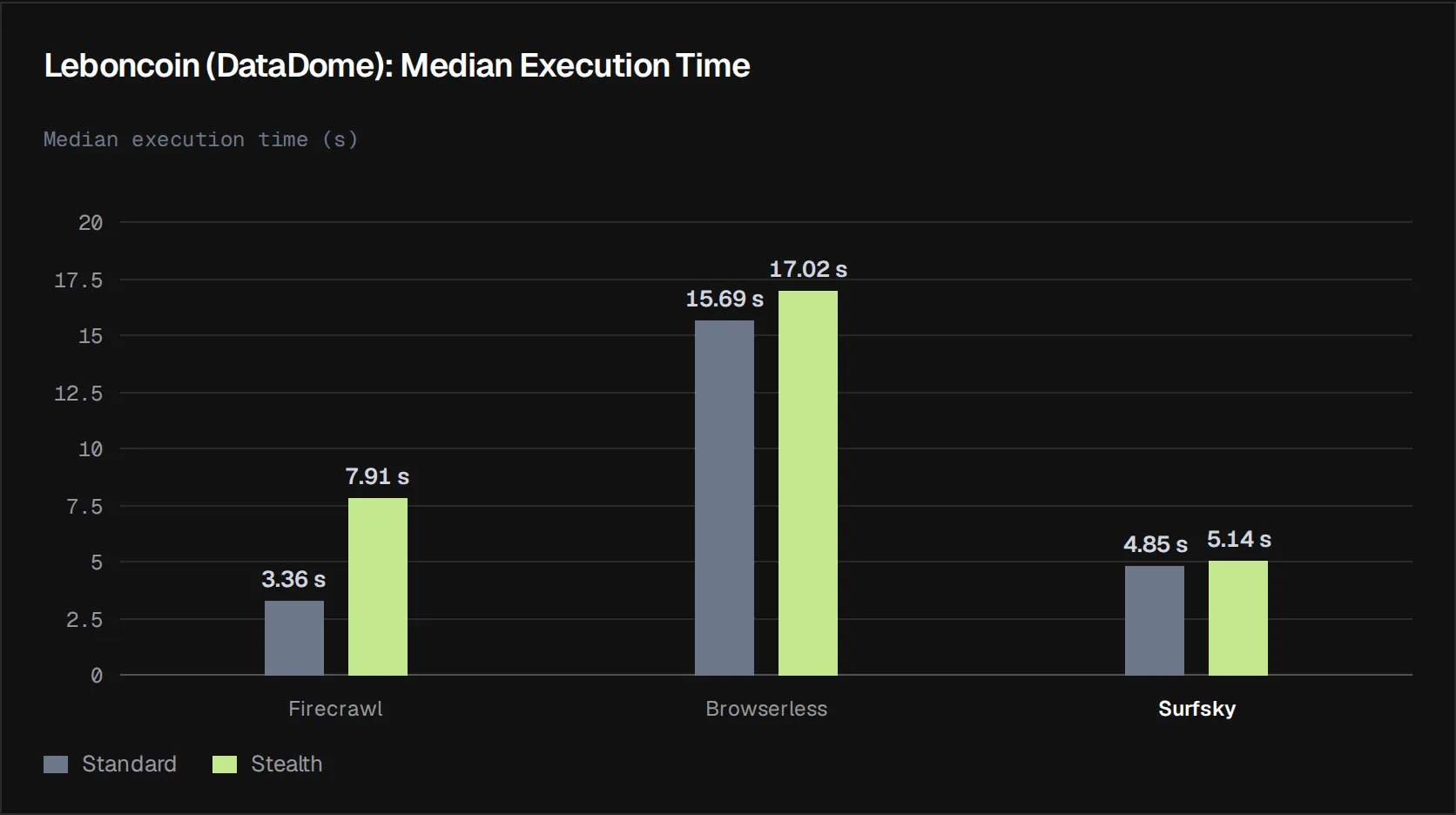
Firecrawl’s median more than doubled in stealth, from 3.36 to 7.91 seconds, while Surfsky’s stayed close to 5 seconds on the same setup.
Browserless showed a smaller reliability improvement, moving from seven to eight successful runs, while also becoming slightly slower. That’s actually a more conventional reliability-for-time trade-off than the pattern observed for Firecrawl.
For a larger DataDome test, with 160 runs on Etsy, see Bypass DataDome with Playwright.
Akamai (Foot Locker)
Foot Locker UK sits behind Akamai.
| Approach | Standard success | Standard median | Stealth success | Stealth median |
|---|---|---|---|---|
| Firecrawl | 100% | 9.18 s | 100% | 7.53 s |
| Browserless | 100% | 15.18 s | 70% | 13.76 s |
| Surfsky | 100% | 4.87 s | 90% | 5.21 s |
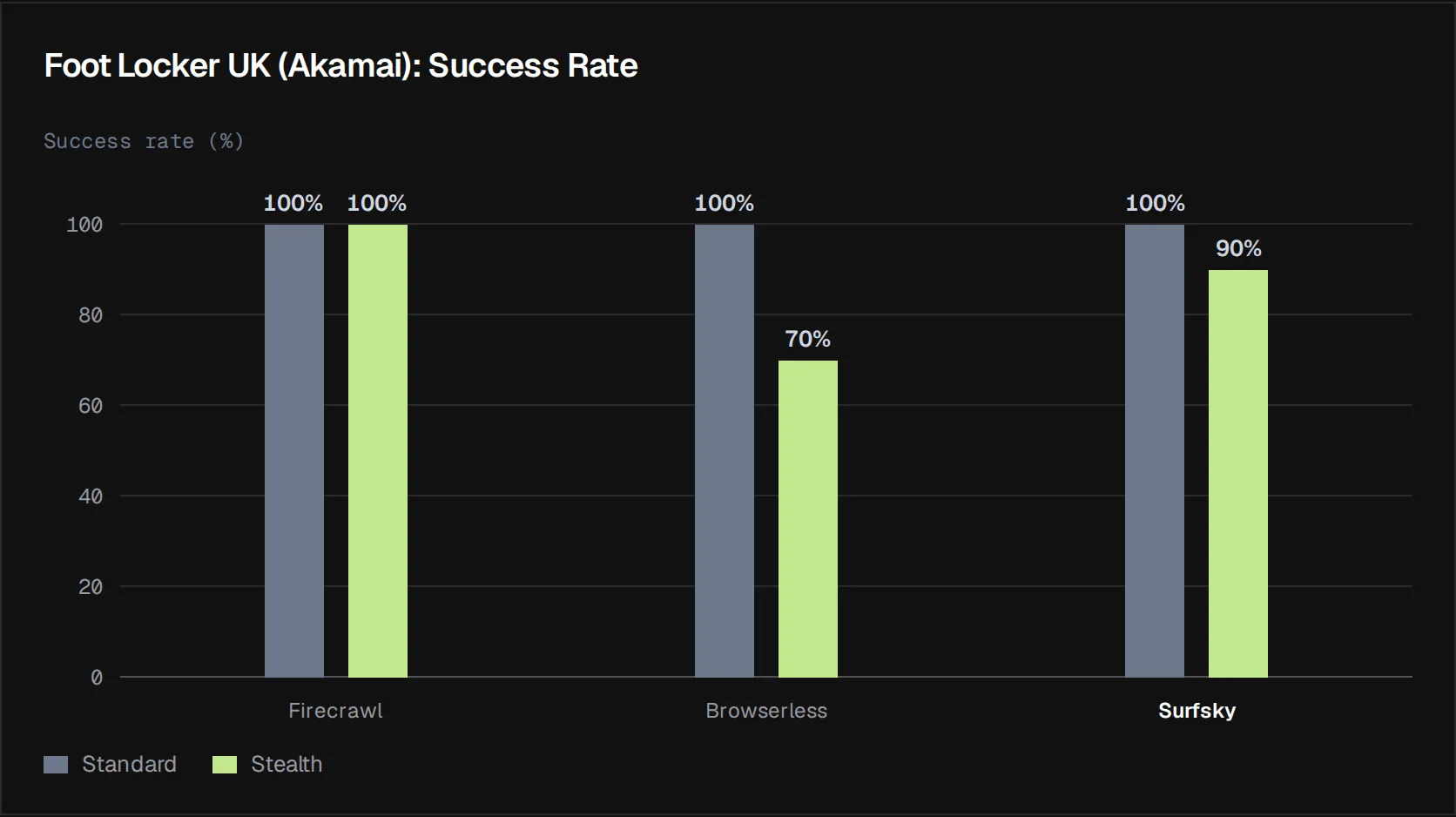
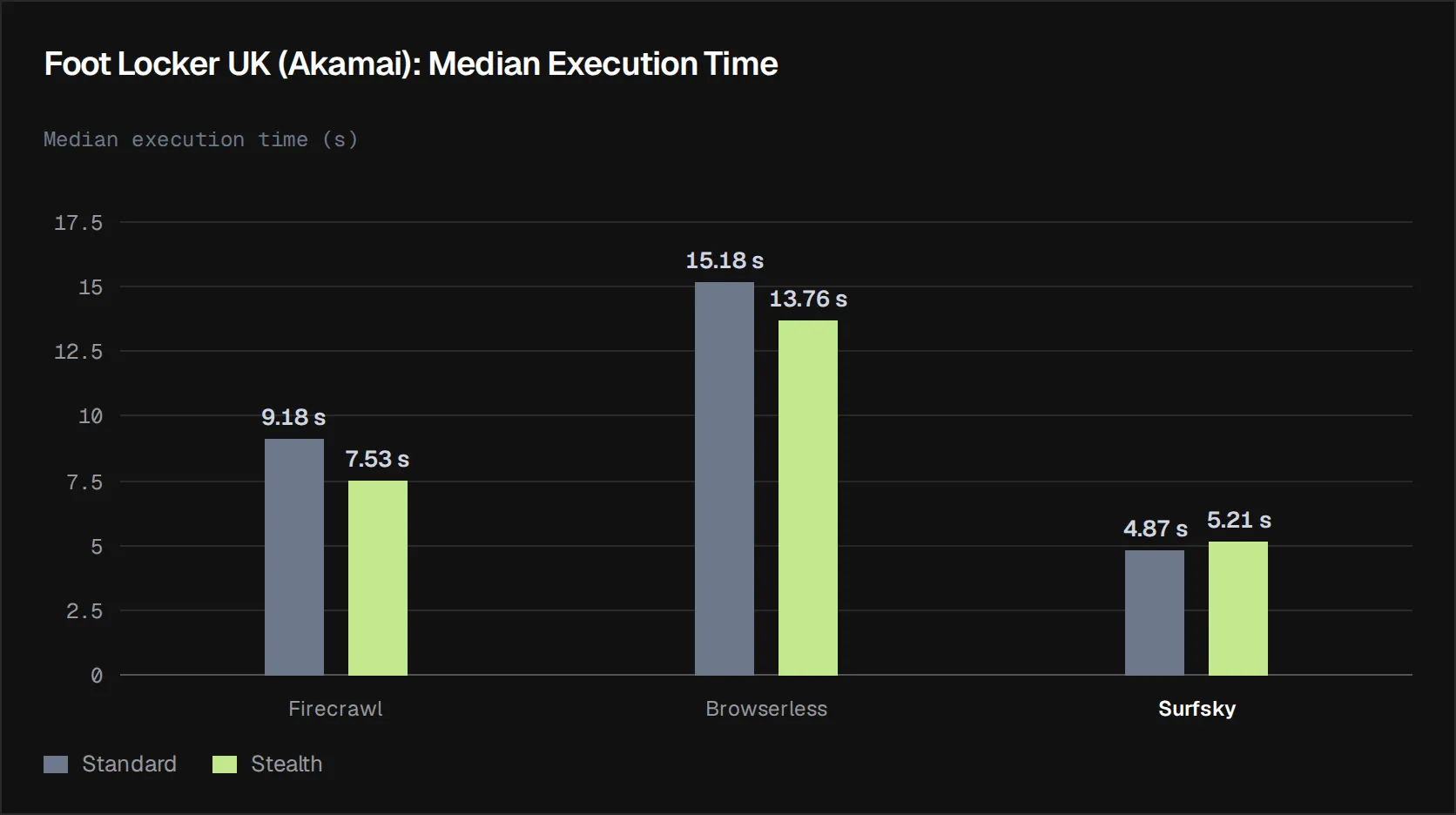
In the standard configuration, every approach passed all 10 runs. Under stealth, Browserless got slightly faster but passed only 7 of 10, so its lower median isn’t an improvement. A faster run that returns no data is worth nothing.
Surfsky, on the same setup, passed 9 of 10 stealth runs with a median of 5.21 seconds. Its one miss was a proxy timeout, not a block. Firecrawl became faster while retaining complete reliability.
Turnstile (ScrapingCourse Turnstile Login Challenge)
The Turnstile test is different: to pass, an approach had to fill in the login form, get through the Turnstile check embedded in it, reach the dashboard and extract the data.
| Approach | Success rate | Median execution time |
|---|---|---|
| Firecrawl | 0% | 33.71 s |
| Browserless | 100% | 24.00 s |
| Surfsky | 100% | 17.05 s |
Note: The Turnstile login workflow was tested as part of the stealth benchmark and wasn’t in the standard benchmark. So standard results aren’t applicable here.
For Turnstile, Browserless and Surfsky completed the workflow successfully on every run, while Firecrawl didn’t complete any runs successfully.
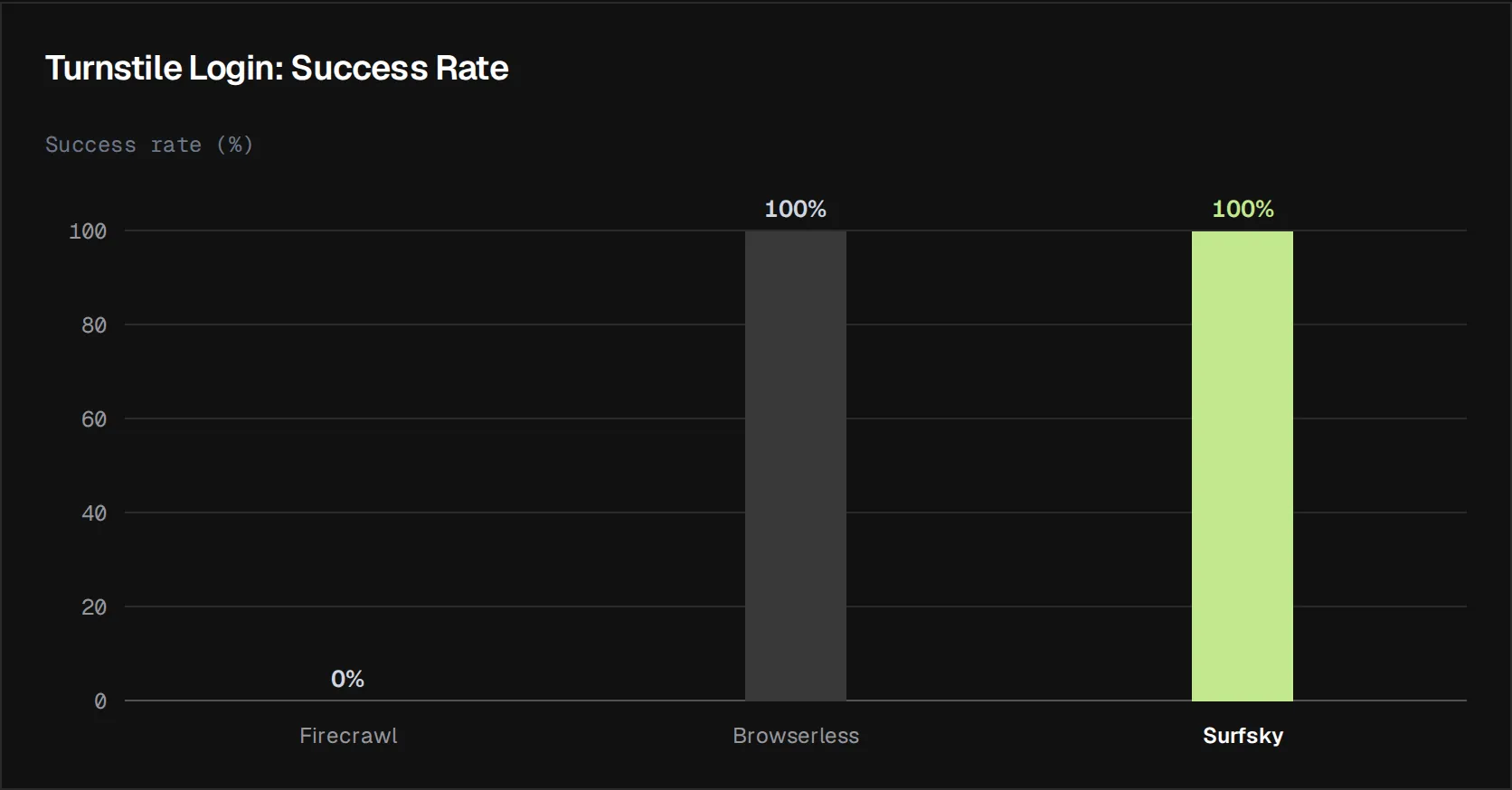
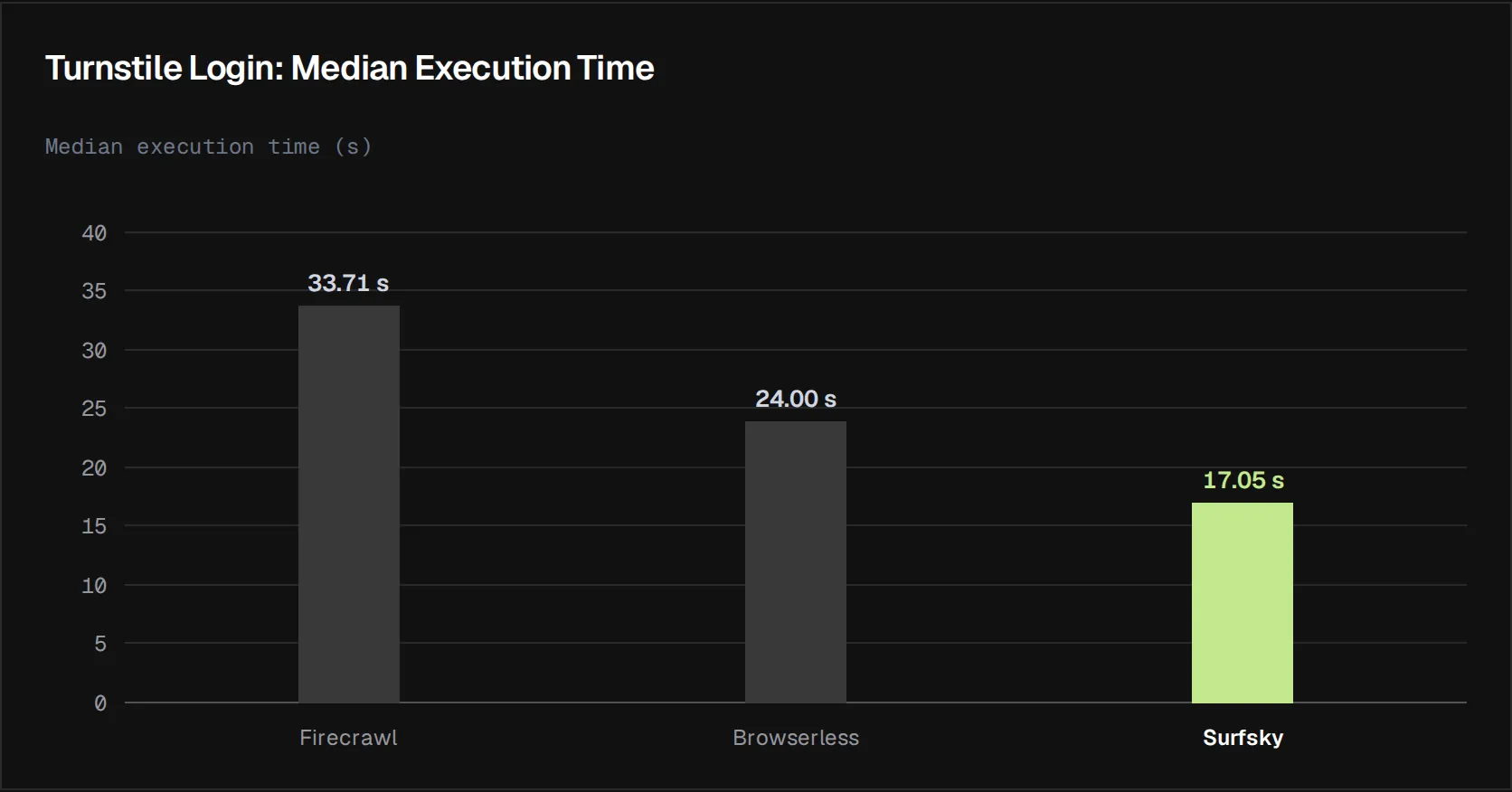
Firecrawl spent the longest time on the workflow, a median of 33.71 seconds, and didn’t complete it once.
Of the two approaches that completed every run, Surfsky had the lower median: 17.05 seconds against 24.00 for Browserless.
Surfsky’s Turnstile median was substantially higher than its execution times on the other protected targets. Most of that time went to the Turnstile check itself: the anti-captcha solver produced the token in 8 of the 10 runs, and the slowest sessions were ones where Turnstile failed its own first verification and issued a token only after a retry. That said, the important result is that the additional time still produced successful completion in every run.
Estimated Cost per Run and per Successful Run
We didn’t directly record cost during the benchmark. To provide an indicative cost comparison, we estimated the cost of a benchmark run using each approach’s cheapest paid plan at monthly prices (no annual discount) and the traffic volume and execution time observed during testing. For the two browser services, we priced time as continuous usage: the hourly rate divided by the number of runs that fit in an hour at the measured median. This reflects a production workload that keeps sessions busy, rather than one isolated run per billing block. These figures represent estimated usage costs, not the actual amount charged during the benchmark.
Because the approaches use different billing models, the calculation differs between services. Firecrawl bills per page (credit-based, no traffic dependency). Browserless and Surfsky both bill browser-time plus proxy traffic separately, so both components have to be included for either estimate to be accurate. We used the same measured traffic volume (3.00 MB/run) across Browserless and Surfsky’s default proxy configuration, since both ran the same pages through a proxied browser session.
A note on Surfsky’s BYOP (Bring Your Own Proxy) option: Surfsky lets you connect your own HTTP, SOCKS5, SSH, or VPN proxy instead of using its managed pool. When you do, Surfsky only bills browser-hour time. Proxy cost is paid separately to whatever proxy provider you’re using, outside Surfsky’s billing entirely. This makes Surfsky’s own cost lower, but it isn’t a like-for-like comparison unless you also add your external proxy provider’s rate on top.
| Approach | Configuration | Estimated cost/run | Estimated cost (1,000 runs) |
|---|---|---|---|
| Firecrawl | Stealth (enhanced proxy) | $0.00380 | $3.80 |
| Surfsky | Stealth (managed proxy) | $0.02684 | $26.84 |
| Surfsky | Stealth (BYOP, Surfsky portion only) | $0.00048 | $0.48 |
| Browserless | Stealth | $0.03252 | $32.52 |
A failed run is billed too, so the cost of usable data is the per-run cost divided by the pass rate. Using each approach’s Stealth pass rate:
| Approach | Stealth pass rate | Est. cost per 1,000 successful runs |
|---|---|---|
| Firecrawl | 72.5% | $5.24 |
| Surfsky (managed proxy) | 95% | $28.26 |
| Surfsky (BYOP, Surfsky portion only) | 95% | $0.50 + your proxy cost |
| Browserless | 87.5% | $37.16 |
Firecrawl’s Stealth pass rate includes the Turnstile login, which it never passed. On page fetches alone it passed 29 of 30 Stealth runs.
Firecrawl
Firecrawl’s Hobby plan costs $19 per month (monthly billing, no annual discount) and includes 5,000 credits. A basic HTML scrape with enhanced proxy costs 1 credit. Enhanced proxy mode is billed at the same rate as a basic request, per Firecrawl’s billing documentation.
$19 ÷ 5,000 = $0.0038 per credit → $0.0038 per run
Surfsky (managed proxy)
Surfsky’s Starter plan costs $29 per month, and the fee becomes usage credit: up to 90 browser hours at $0.30/hour. Browser time is billed by the minute, rounded up. Premium proxy traffic, which this benchmark used, comes out of the same credit at $9/GB. The plan also includes 5 GB of shared proxy traffic, which we didn’t use.
Using this benchmark’s measured traffic (3.00 MB/run) and median execution time (5.72 s):
- Runs per hour: 3,600 ÷ 5.72 s = 629.4
- Browser time: $0.30 ÷ 629.4 = $0.00048
- Proxy traffic: 3.00 MB = 0.00293 GB × $9 = $0.02637
- Total: $0.02684 per run
Surfsky (BYOP)
If you supply your own proxy instead of using Surfsky’s pool, only browser time is billed by Surfsky:
- Browser time: $0.30 ÷ 629.4 runs = $0.00048 per run
This figure doesn’t include what you’d pay your own proxy provider. It only reflects Surfsky’s side of the bill. Total cost with BYOP depends entirely on your proxy provider’s rate. At 3.00 MB per run, BYOP comes out cheaper than Firecrawl’s $3.80 per 1,000 runs if your proxy costs less than about $1.13/GB.
Browserless
Browserless’s Prototyping plan costs $35 per month (monthly billing) and includes 20,000 units, so one unit costs $0.00175. One unit covers up to 30 seconds of browser connection time; residential proxy traffic is billed separately at 6 units/MB.
Using the same 3.00 MB/run traffic figure and Browserless’s own stealth median of 17.46 s:
- Hourly rate: 120 units × $0.00175 = $0.21
- Runs per hour: 3,600 ÷ 17.46 s = 206.2
- Time: $0.21 ÷ 206.2 = $0.00102
- Proxy: 3.00 MB × 6 units/MB = 18 units = $0.03150
- Total: $0.03252 per run
Note: All estimates use monthly (non-annual) plan pricing. Firecrawl’s flat per-page rate has no traffic component by design. The BYOP figure is not directly comparable to the other rows without adding an external proxy cost. It’s included to show what Surfsky itself charges when proxy is sourced elsewhere.
Reducing Execution Costs: Proxy Traffic and Browser Time
The cost figures above use default configuration. Firecrawl charges a flat credit per page, so its cost only moves with the number of pages. For the two browser services, proxy traffic and browser time drive the cost, and that’s where the savings are:
- Block unnecessary resource types. Images, fonts, and stylesheets rarely matter for data extraction, but they’re often the bulk of a page’s transferred weight. Blocking them at the request level (standard practice with Playwright/CDP) cuts proxy traffic, and therefore cost, on any media-heavy target like marketplaces or e-commerce catalogs.
- Reuse sessions instead of starting fresh. A persistent profile that keeps its cookies and cache across multiple visits doesn’t need to re-download shared static assets (site-wide CSS, JS, fonts) on every single request the way a fresh session does. Several pages in one session also share Surfsky’s one-minute minimum or Browserless’s 30-second unit instead of paying it per page. The estimates above already assume this: they divide hourly cost by runs per hour, so a single isolated run would cost more (one billed minute on Surfsky, one 30-second unit on Browserless).
- Run multiple tabs in parallel within one session. Extracting from several pages at once inside a shared browser context reduces wall-clock time. Whether it also reduces total billed browser-hours depends on how the provider meters concurrent tabs, so it’s worth checking against your specific plan.
- Match proxy tier to the target. Not every site needs premium residential IPs. For unprotected or lightly-protected targets, a cheaper shared-pool proxy is often enough; pay for premium where the site scores IP trust.
- Avoid re-fetching pages that haven’t changed. For targets where content updates infrequently (catalogs, directory listings), caching the last successful result avoids paying for a full re-render when nothing changed.
None of this changes the pass/fail numbers above, which were measured without these optimizations. Treat the browser-service estimates as a ceiling: a production setup that applies them will usually cost less.
When to Choose Surfsky vs a Scraping API
| Workload | Better fit in this benchmark | Evidence |
|---|---|---|
| URL in, markdown or JSON out, no login | Scraping API (Firecrawl) | 69/70 page-fetch runs; 2.33 s on the baseline; $3.80 per 1,000 runs |
| Login or form behind Turnstile | Stealth browser (Surfsky or Browserless) | 10/10 each; Firecrawl 0/10 |
| Protected pages where latency matters | Surfsky | 4.9–5.9 s median on Indeed and Foot Locker UK in both configurations |
| One setup across all targets | Surfsky | 40/40 Standard, 38/40 Stealth on one configuration |
| You already pay a proxy provider | Surfsky with BYOP | $0.48 per 1,000 runs on Surfsky’s side, plus your proxy cost |
Firecrawl starts from a URL and returns the page as markdown or JSON. It can also run Playwright code on a page it has scraped through its interact endpoint, which is how it attempted our Turnstile login. Surfsky starts from the browser: you connect our SDK, Playwright or Puppeteer over CDP and drive the session yourself, while Surfsky handles the fingerprint and proxy underneath.
Choose Surfsky when:
The flow goes through a CAPTCHA or Turnstile. On our Turnstile login, Firecrawl ran the form through its interact endpoint and didn’t reach the dashboard in any of its 10 runs. Surfsky passed all 10 with its built-in anti-captcha solver switched on, and we didn’t write any solver code.
You need to stay logged in. Logins and multi-step forms depend on cookies that carry over from one step to the next. In Surfsky that’s one browser session, and a saved profile lets the next session start already logged in.
Firecrawl is enough when:
The target has no bot protection, or protection Firecrawl already gets past. All three approaches passed every run on the unprotected baseline, and Firecrawl was the fastest there at 2.33 seconds. It also passed all 10 runs on Leboncoin (DataDome) and Foot Locker UK (Akamai) in both configurations.
You need page content in bulk. If the job is a URL in and markdown or JSON out, with no login, Firecrawl does it in one call. It charges one credit per page, so you know the cost up front. A browser service bills for browser time and proxy traffic, and both change from page to page.
Engineering Implications: Control, Upkeep and Cost
Surfsky and Browserless both completed all 10 Turnstile login runs, and Surfsky’s median was faster: 17.05 s against 24.00 s.
Passing it took control over the sequence of actions inside the session, such as when to wait for the Turnstile token and when to fill and submit the form.
As managed services, they also take browser and proxy upkeep off your team. When a target updates its anti-bot rules, the provider re-tunes fingerprints and replaces burned proxies, so your engineers don’t get paged for it.
Then there is cost. Most of Surfsky’s estimated cost per run is proxy traffic, so it drops as pages get lighter, and drops further with BYOP if you already pay a proxy provider. The cost of the extra control a managed browser provides depends on how you set up the account.
The benchmark also shows that you should evaluate stealth capability by target rather than treat it as a universal feature. A configuration that improves reliability on one protection mechanism can have little effect or even reduce reliability on another.
Conclusion: Which Approach Fits Your Workload
Surfsky is the better fit when:
- The data is behind a login or an interactive check. On the Turnstile login, Surfsky passed 10 of 10 runs with a median of 17.05 seconds. Firecrawl, the only scraping API in the test, ran the same login through its interact endpoint and passed none.
- The site is protected and response time matters. On Indeed (Cloudflare) and Foot Locker UK (Akamai), Surfsky’s median was 4.9 to 5.9 seconds in both configurations, the lowest of any approach that returned the data. Firecrawl took 7.5 to 11.8 seconds on the same targets.
- You don’t want to tune stealth per target. Surfsky ran one setup in both benchmarks and passed 40 of 40 Standard runs and 38 of 40 Stealth runs. Both misses were proxy timeouts, not blocks. Browserless, by contrast, went from 0 to 10 passes on Indeed after switching to stealth, and from 10 to 7 on Foot Locker UK.
For one-off page fetches that don’t need a session, Firecrawl is the better fit. It passed 69 of 70 page-fetch runs, one more than Surfsky, and costs several times less per page.
These results cover four sites and 10 runs per target, so test your own targets before choosing a tool.