If your scraper or test stops at a “Verify you are human” box on a Cloudflare site, that’s Turnstile:
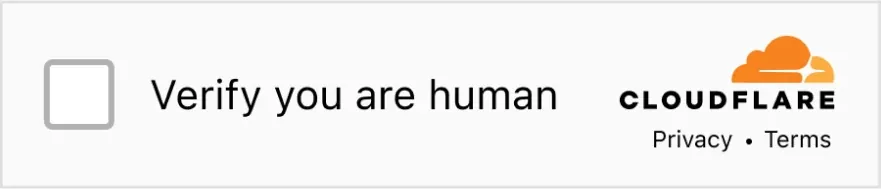
Clicking it from code is harder than it looks. The checkbox sits inside an iframe from challenges.cloudflare.com, under a closed shadow root, so Playwright’s locators can’t see it. A click at fixed coordinates stops working as soon as the widget shifts.
A Surfsky browser usually gets through Turnstile without a click. If the checkbox does appear, Surfsky solves it on its own.
Key Takeaways
- Turnstile has 3 modes and mostly decides in the background. The checkbox shows only when it isn’t sure.
- Surfsky often passes with no checkbox: a real-device fingerprint, 100M+ residential IPs, a human cursor.
- When the widget asks, one API call clicks it through the iframe and closed shadow root. No 300-second token to paste.
- On a real Turnstile login form over US residential IPs, the solver passed 5 of 5 runs, each in 2 to 6 seconds.
- Benchmark login flow: Surfsky 10 of 10 at a 17-second median; the scraping API finished 0.
Here it is in Python. Copy your API token and base URL from the Surfsky dashboard, then install the Python SDK (it needs Python 3.12 or newer):
export SURFSKY_API_TOKEN="your-token"
export SURFSKY_API_BASE_URL="your-base-url"
pip install surfsky
import asyncio
from surfsky import AntiCaptcha, AsyncSurfsky
async def main():
async with AsyncSurfsky() as client:
async with client.browser(anti_captcha=AntiCaptcha(enabled=True)) as browser:
await browser.goto("https://demo.turnstile.workers.dev/")
result = await browser.send(
"Captcha.solve", {"type": "turnstile", "timeout": 60000}
)
print(result["status"])
asyncio.run(main())The browser opens the page. If Turnstile lets it through, there’s nothing to click. If the widget asks for a click, the solve command clicks the checkbox for you.
You don’t have to handle the token. The widget puts it into the form’s hidden cf-turnstile-response field, the same as it would for a person, and you submit the form as usual.
Test Your Browser Stack for $5
Run your Playwright code through a real browser and see which requests pass.
- No card required
- API key in 30 seconds
- Change one line of code
What Turnstile looks at
Turnstile has three modes. Managed, the one Cloudflare recommends, picks between a silent check and the checkbox depending on how risky the visitor looks. Non-interactive shows a spinner and never asks for a click. Invisible shows nothing at all.
So the checkbox is the fallback. Cloudflare put it plainly in the Turnstile GA announcement: “the actual act of checking a box isn’t important, it’s the background data we’re analyzing while the box is checked that matters.” The Turnstile docs name where that data comes from: proof-of-work, proof-of-space, probing web APIs, and “various other challenges for detecting browser-quirks and human behavior.”
Cloudflare doesn’t publish the exact signals. Going by research, it starts with the connection: the TLS fingerprint (JA3/JA4, which Cloudflare computes during the handshake), the HTTP/2 settings and the IP’s reputation. Next comes the browser itself, with navigator.webdriver, plugins and languages, the GPU that WebGL reports, and how canvas and audio render. Then whether all of those values describe one real device, so a Mac User-Agent with Windows fonts stands out. Last is input: whether mouse and keyboard events are trusted, and how they’re timed.
The checks run inside Cloudflare’s iframe, the same place as the checkbox. When the widget passes, it writes a token into a hidden field named cf-turnstile-response, and the site’s server checks it with Cloudflare.
In practice, the browser does most of the work before anyone clicks, and a clean one often never sees the checkbox. In one of our test runs, the widget already had its token by the time the script finished typing the password.
Why clicking it yourself is hard
Calling element.click() or dispatchEvent from the page doesn’t work at all. The checkbox is in a cross-origin iframe, so page scripts can’t reach it, and events created in JavaScript have isTrusted set to false anyway.
Playwright’s locators don’t go into closed shadow roots, so frame.locator("input[type=checkbox]") comes back empty. Patchright does support closed shadow roots, which gets you to the element, but its click still moves the mouse straight onto the box in one step.
That’s why so many scripts click at fixed coordinates, usually about 30 pixels in from the widget’s left edge. It works until the widget changes size or moves. Even when the click lands, the cursor appears on the box out of nowhere.
Token-solving services solve the widget in someone else’s browser and send you the token, which you then have 300 seconds to use. That can get one form through. Your own browser still hasn’t passed anything, though, so you’re back at the checkbox on the next form.
How Surfsky gets through
Turnstile mostly judges the browser, so that’s where Surfsky puts the work.
Fingerprint from a real device
The browser is an antidetect build of Chrome. Each session gets a fingerprint recorded on a real device: a GPU with its WebGL parameters, screens and fonts that fit the OS, CPU and memory values that go together, and a User-Agent and Client Hints that match the browser build. The engine applies it at startup, without an injected script or extension a page could find. Canvas returns an image recorded on a real machine with the same GPU, and TLS and HTTP/2 come from Chrome’s own network stack, so they match the browser as well. Cloudflare’s checks get the same answers inside the widget’s iframe as in the main window. The fingerprint docs go through the details.
Residential IPs
Traffic goes through residential IPs. The premium pool has over 100 million residential and mobile IPs, and you can target a country, a city or an ASN. The browser takes its time zone, language and geolocation from the exit IP, so they agree with it. If the proxy drops, requests fail instead of slipping out through the datacenter’s connection.
Human input
Input looks like a person’s. Surfsky’s human emulation moves the cursor with changes in speed, small corrections and tremor, slows down near the target and varies where it clicks. Typing has uneven gaps and the occasional wrong key followed by Backspace. Everything goes through the browser’s own input pipeline, so the page gets trusted events.
That’s usually enough for Turnstile to pass in the background. When the widget does show the checkbox, the solve method finds it inside Cloudflare’s iframe and closed shadow root and clicks it with the same human emulation, in the same session that went through the checks.
Test runs
Here’s Surfsky clicking through Turnstile on a test sign-in form:
A real sitekey takes a little longer, because Turnstile runs its background checks first. We ran the solver five times on a real Turnstile login form through our US residential IPs, and every run passed, each in 2 to 6 seconds.
We also tested this on a full login flow in our scraping benchmark: fill in the form, get through Turnstile, open the dashboard and read the data. Surfsky finished every run, with a median of 17 seconds for the whole flow, from starting the browser to reading the dashboard. Another managed browser service finished every run too, but took 24 seconds, and the scraping API we tested didn’t finish any.
How to solve it with Playwright
If you already have Playwright or Patchright code, you can keep it. Start a Surfsky browser through the API, connect over CDP and send the same command through a CDP session:
pip install patchright httpximport asyncio
import os
import httpx
from patchright.async_api import async_playwright
API = os.environ["SURFSKY_API_BASE_URL"]
HEADERS = {"X-Cloud-Api-Token": os.environ["SURFSKY_API_TOKEN"]}
async def main():
async with httpx.AsyncClient(timeout=120) as http:
response = await http.post(
f"{API}/profiles/one_time",
headers=HEADERS,
json={"anti_captcha": {"enabled": True}},
)
session = response.json()
async with async_playwright() as pw:
browser = await pw.chromium.connect_over_cdp(session["ws_url"])
page = browser.contexts[0].pages[0]
cdp = await page.context.new_cdp_session(page)
await page.goto("https://demo.turnstile.workers.dev/")
result = await cdp.send("Captcha.solve", {"type": "turnstile", "timeout": 60000})
print(result["status"])
browser_cdp = await browser.new_browser_cdp_session()
await browser_cdp.send("Browser.close")
asyncio.run(main())It prints success, like the SDK version. You can skip patchright install chromium because the browser runs in our cloud, and plain Playwright works with the same code if you change the import.
To have Turnstile handled in the background instead, add it to auto_captcha_types, send Captcha.autoSolve before you open the page and listen for Captcha.solveCompleted. The Turnstile guide has examples for both SDKs and Playwright.
When it doesn’t pass
The solve method returns one of three statuses, or a CDP error:
success: the widget took the click, or passed on its own while the solver waited.solutionholds the token when there is one.not_detected: the widget had already passed when you called, or never asked for a click.failed: no token came after the click.- “No captcha detected on the page” (the error): there was no widget when you called. Either it hadn’t loaded yet, or the site blocked you before it rendered one.
A success status only means the widget accepted the click. Check that you got the page you were after before you count the job as done.
If you keep getting the checkbox, or failed, look at the session first. Use the premium pool or your own residential proxies in the site’s country; the shared pool is meant for testing. Keep one IP for the whole session, because an IP that changes on every request while the cookies stay the same doesn’t look like a normal visitor. For sites you come back to, use a persistent profile. On sites with Cloudflare’s full-page challenge, passing it sets a cf_clearance cookie that’s tied to the visitor and device it was issued to, and the profile keeps that cookie together with the fingerprint and IP between runs.
If you drive the browser with Playwright or Puppeteer, try our SDK as well. Both libraries add their own scripts and bindings to the page, and Playwright also fires marker events that anti-bot scripts listen for. We explain why we built our own in Tired of Patching Playwright.
A 403 or a Cloudflare error page before any widget appears is a different problem. The block happened before Turnstile, so no solver will help. Change the IP and slow down.
Getting started with Surfsky
Sign in to the dashboard, run the first Python example against the demo page, then point it at your own. If you work with a coding agent, give it our skill file and it will set Surfsky up in your project.